Introduction to the Signsoft API
Welcome to the era of innovation! In a world where technology shapes every aspect of our lives, Signosoft brings efficiency, savings and sustainability through digital signatures. With over 50 million registered subscriptions, serving customers in every corner of the globe, Signosoft is transforming the way the world does business. Goodbye wasted paper, hello to a more sustainable environment.
With over 12 million users already enjoying our platform, now is the time for you to join us too! Introducing our API, the essential tool for integrating Signosoft's powerful signature features into your software. Quickly, conveniently and securely, our API offers a unique solution, ensuring an exceptional experience for you and your users, including:
- Document Creation: Generate documents directly within your system.
- Send for Signature: Send documents to be signed digitally.
- Digital Signatures: Sign documents using various authentication methods.
- Document Management: Organize and control all your documents in one place.
- And much more!
Business Case: Electronic Document Signing with Notifications and Post-Signing Processing
As a client, I want to upload a document, specify who needs to sign it, receive the signed document, and ensure that all parties are notified. After that, I need to forward the document elsewhere (e.g., to an archive).
Step 1: Authentication
First, authenticate with the Signosoft server using the restServerLogin API to obtain a token. This token must be included as an Authorization header in all subsequent requests.
POST /restServerLogin
{
 "login": "your_username",
 "password": "your_password"
}
SIMULATE YOURSELF
Input Data
Generated Code
//Your code will show thatCall response
//Your code will show thatWhat happened?
You will receive a unique token, which must be included in the headers of your requests to authorize your application to perform all operations on the server. Access credentials can be obtained from the Signosoft administration console.
LEARN MOREStep 2: Uploading the Document
Next, upload the document that needs to be signed using the uploadDocument API method. Provide the following parameters:
- docData: Base64-encoded content of the PDF document.
- docOwner: Identification of the document owner.
- documentName: The name of the document, displayed during the signing process.
- type, positionX, positionY, page: Specify where signatures should be placed on the document.
- signerlogin, signerfirstname, signersecondname: Identification of the signer.
POST /uploadDocument
                                  {
                                  "docData": "base64_encoded_document",
                                  "docOwner": "owner_id",
                                  "documentName": "Document Title",
                                  "type": "signature",
                                  "positionX": 100,
                                  "positionY": 200,
                                  "page": 1,
                                  "signerlogin": "signer_login",
                                  "signerfirstname": "Signer First",
                                  "signersecondname": "Signer Last"
                                  }
What happens during the upload process?
Simply put, documents are uploaded in an encoded format containing information about the signers and the types of signatures. The server receives the documents, stores them, and forwards them to the respective signers.
LEARN MOREStep 3: Creating the Signing Link
Use the createDocLink API method to create a signing link. Provide the following parameters:
- doctoken: The document token obtained from
uploadDocument. - finalizeWebhookUrl: URL for notifications after signing and finalization.
- finalizeUrl: URL where users are redirected after finalization.
- finalizeType: Options: close, redirect or none.
POST /createDocLink
                     {
                        "doctoken": "document_token",
                        "finalizeWebhookUrl": "https://yourapp.com/webhook",
                        "finalizeUrl": "https://yourapp.com/confirmation",
                        "finalizeType": "redirect"
                     }
Why use document links?
Document links (doclinks) are a convenient feature that allows you to generate a shareable link for a specific document. This link can be quickly and easily sent via channels like WhatsApp, streamlining access.
LEARN MOREStep 4: Signing the Document
The signer connects to the provided Signosoft URL to fill in the required signatures. After signing, they click the "Finalize" button unless automatic completion is enabled.
With the generated URL, developers can:
- Redirect users directly to the Signosoft URL.
- Open the document in a new browser window.
- Embed the signing interface using an iframe in your web application.
Step 5: Notification and Finalization (Webhook)
After all signatures are completed, Signosoft initiates finalization and sends an HTTP request to the specified finalizeWebhookUrl with:
- docId and docToken: Identification of the finalized document.
- operation: Information about the completion, e.g., "document.finalized".
- finalizeImplResult and finalizeImplDesc: Results of the finalization plugin.
GET /finalizeWebhookUrl
                     {
                     "docId": "finalized_document_id",
                     "docToken": "finalized_document_token",
                     "operation": "document.finalized"
                     }
Automate operations
With the webhook functionality, Signosoft notifies your application whenever an event occurs related to a document, making processes faster and more automated.
LEARN MOREStep 6: Post-Signing Document Processing
Upon receiving the notification, initiate the process to send the document to another system. Options include:
- Automatic document export using
downloadDocument. - Integration with DMS or third-party API for direct uploads to an archive.
Automate downloads
Using this feature, you can download documents efficiently, with the option to secure them with a password for added protection.
LEARN MOREStep 7: Deleting the PDF Document from Signosoft Server
After successful archiving, delete the document from the Signosoft server using:
DELETE /deleteDocument
                     {
                     "docToken": "document_token"
                     }
This step is crucial for GDPR compliance and other data protection regulations.
Automate deletions
This functionality allows you to delete documents, templates, and contracts in a single request, enabling the removal of multiple items at once.
LEARN MOREExample: Using the Finalization Plugin
If using the finalization plugin, define logic to send the document to another system within the plugin itself. When calling createDocLink, include finalizeEnablePlugin and ensure REST calls to upload the document post-finalization.
Summary
This process leverages essential Signosoft API methods:
restServerLoginfor authentication.uploadDocumentfor document uploads.createDocLinkfor signing links.finalizeWebhookUrlfor completion notifications.downloadDocumentfor retrieving signed documents.deleteDocumentfor removing documents from the server post-processing.
This approach ensures a smooth signing process, timely notifications for all parties, and readiness for document archiving or further processing, providing a comprehensive end-to-end solution for electronic signing.
The diagram below illustrates the basic operation of the API. Each circle represents an endpoint, which can be divided into four categories: Documents, Contracts, Document Links, and Signatures. The entire operation revolves around the production of tokens. When creating a document or contract, a token is generated, which allows it to be related to other endpoints. Note that before using any endpoint, it is necessary to complete the authentication process.
As you read through the documentation, each endpoint will be detailed more specifically.
Initial instructions

To provide a clearer understanding of the documentation, the explanation of each endpoint is divided into five sections:
- Description - In this subsection, the functionality of the endpoint is explained, sometimes with real use cases.
- Parameter - In this subsection, the required and optional parameters necessary for the correct operation of the feature are detailed.
- How to implement - In this subsection, implementation examples are provided in the main technologies on the market, such as Java, PHP, Python, and Go.
- Returns - In this subsection, the returns provided by the API are detailed in JSON format, along with an explanation of each one.
- Try Out - This button redirects to Swagger, allowing you to test the functionality in real-time.
Authentication
The API has authentication with Bearer Token, which is one of the most common and secure methods to protect APIs. In this model, an access token is generated after the user or application login process, and must be included in the header of each subsequent request. This token acts as an access key, validating the identity of the requester and ensuring that only authorized users can interact with the API. The use of Bearer Tokens is crucial to maintain the integrity and security of information, preventing unauthorized access and protecting sensitive data transmitted between the client and the server.
Description
When a client authenticates via the /restServerLogin route, it receives a key (called a
token) that allows the use of other resources. This token is required to create and sign documents.
To use routes other than user creation, you must provide this token in the request header. We'll
talk more about this later.
The diagram below demonstrates the authentication process, when the user has their authentication credentials.
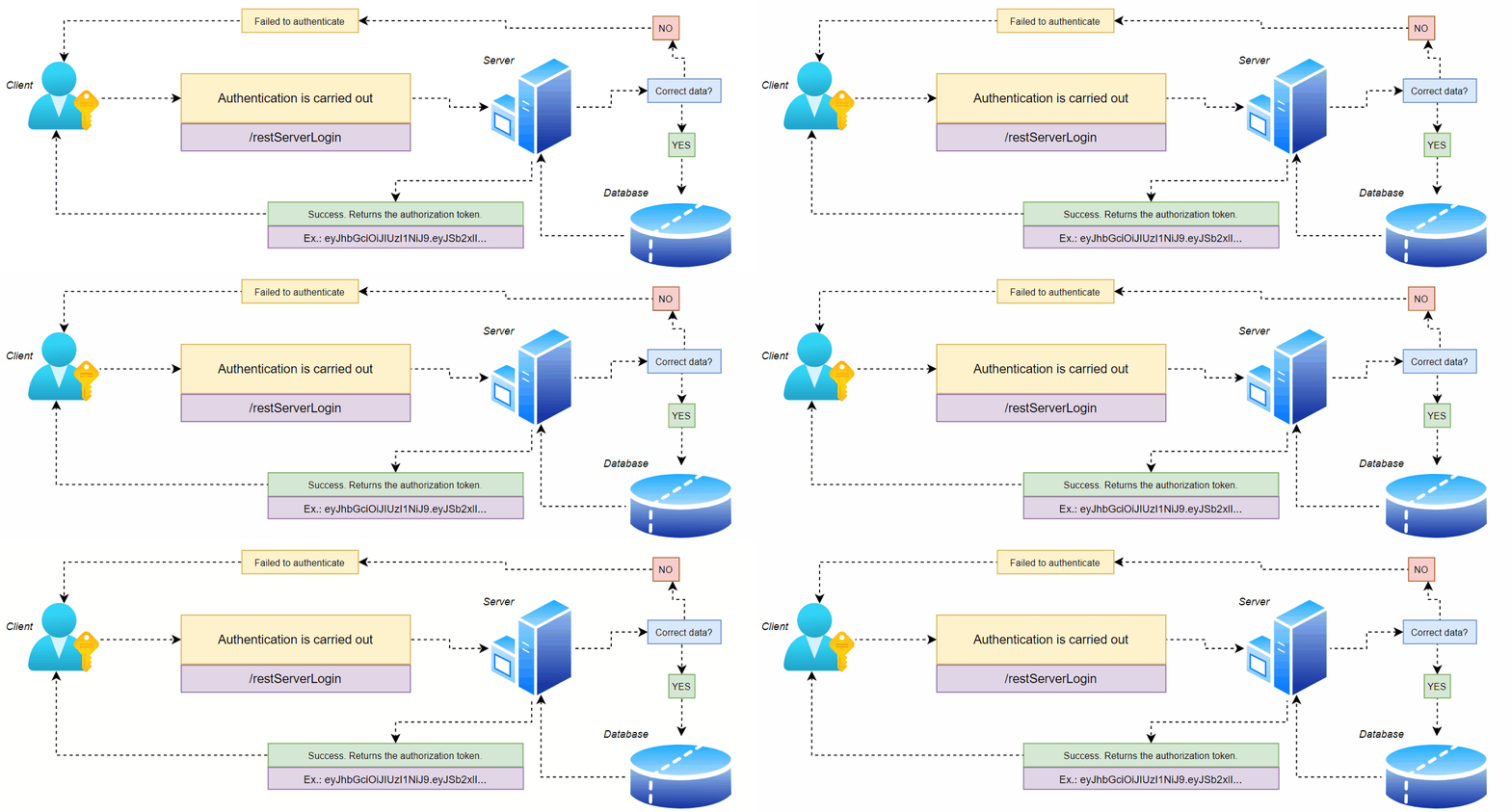
1) To authenticate, the user enters their credentials.
On the Signosoft server (in the database in the Servers table or in the administration
console), the customer must create a trusted server.
2) The server receives the JSON and verifies the data.
3) If the data is correct, the server responds with an authorization token, which will be
needed for future requests.
Token: An OAuth token is a key that allows an application to access a user's data on another service without needing the user's password.
Parameters
To carry out the request, some parameters are mandatory. See the list below:
- login – String – The access login created in the administration console. Required
- password – String – The access password. Required
How to implement
You can implement the function of creating users in different places on your system. See an example of implementation below:
import java.net.URI;
import java.net.http.HttpClient;
import java.net.http.HttpRequest;
import java.net.http.HttpResponse;
import java.net.http.HttpRequest.BodyPublishers;

public class PostRequestExample {
    public static void main(String[] args) {
        HttpClient client = HttpClient.newHttpClient();
        String uri = "https://context/api/restServerLogin";

        String json = "{\"login\":\"your_login\", \"password\":\"your_passowrd\"}";

        HttpRequest request = HttpRequest.newBuilder()
            .uri(URI.create(uri))
            .header("Content-Type", "application/json")
            .POST(BodyPublishers.ofString(json))
            .build();

        client.sendAsync(request, HttpResponse.BodyHandlers.ofString())
            .thenApply(HttpResponse::body)
            .thenAccept(System.out::println)
            .join();
    }
}
import requests

url = "https://context/api/restServerLogin"
payload = {
    "login": "your_login",
    "password": "your_passowrd"
}
headers = {
    "Content-Type": "application/json"
}

response = requests.post(url, json=payload, headers=headers)

print(response.status_code)
print(response.json())
  <?php
$url = 'https://context/api/restServerLogin';
$data = array('login' => 'your_login', 'password' => 'your_passowrd');
$options = array(
    'http' => array(
        'header'  => "Content-Type: application/json\r\n",
        'method'  => 'POST',
        'content' => json_encode($data),
    ),
);

$context  = stream_context_create($options);
$result = file_get_contents($url, false, $context);
if ($result === FALSE) {
    /* Handle error */
}

var_dump($result);
  ?>
package main

import (
    "bytes"
    "fmt"
    "net/http"
)

func main() {
    url := "https://context/api/restServerLogin"
    json := []byte(`{"login":"your_login", "password":"your_password"}`)
    req, err := http.NewRequest("POST", url, bytes.NewBuffer(json))
    req.Header.Set("Content-Type", "application/json")

    client := &http.Client{}
    resp, err := client.Do(req)
    if err != nil {
        panic(err)
    }
    defer resp.Body.Close()

    fmt.Println("response Status:", resp.Status)
    fmt.Println("response Headers:", resp.Header)
    body, _ := ioutil.ReadAll(resp.Body)
    fmt.Println("response Body:", string(body))
}
Returns
When the user is validated correctly, it returns a status code 200, providing some important information, for example:
{
  "tokenExp": 1717161555540,
  "result": "OK",
  "tokenExpIn": 3599,
  "token": "eyJ0eXAiOiJKV1QiLCJhbGciOiJIUzUxMiJ9.eyJsaW4iOiJ.."
}
- tokenExp – Long – Expiration time in UNIX format.
- result – String – Result of the operation
- tokenExpIn – Token – How many seconds remain until the token expires.
- token – String – Authorization token.
The Unix timestamp is the number of seconds since January 1, 1970, used to represent dates and
times in computer systems.
The advantage of the Unix timestamp is its simplicity and consistency, allowing easy storage and
comparison of dates and times without complications with time zones.
Next sections!
In the next section, the first part of this documentation, which refers to authentication, will be presented.
By the end of the next section, your application will be able to authenticate with the Signosoft server.
Documents
Uploading documents, such as PDF and DOC files, is an essential feature in many modern platforms. This functionality allows users to send files directly to the server, facilitating the storage, sharing, and processing of important information. By supporting formats like PDF and DOC, the platform ensures compatibility with the most commonly used file types, providing a seamless and efficient user experience. Additionally, the upload process must be secure and reliable, ensuring that documents are transmitted and stored in a manner that protects them from unauthorized access.
Uploading documents
Description
Uploading documents with our API is quite simple. All documents are sent encoded in Base64, and you
can set various configurations for the document.
Later on, you will see some examples with use cases to understand how easy it is to integrate with
your system.
Base64 is an encoding scheme that allows you to convert binary data (such as images, documents, or other types of files) into a string of text characters. This is done to ensure that data can be transmitted securely through text-only systems such as emails and URLs.
- Compatibility with text systems:
Many data transmission systems (such as emails and URLs) were originally designed to handle text only. Base64 ensures that binary data can be transmitted across these systems without loss or corruption.
- Security and integrity:
Because Base64 encoding transforms binary data into text, there is less risk of problems related to special or control characters that could interfere with data transmission.
- Ease of handling:
Base64-encoded data can be manipulated as text in scripts, configuration files, and other contexts where working directly with binaries may be complicated or unsupported.
The upload process follows three main steps, which we will explain below:
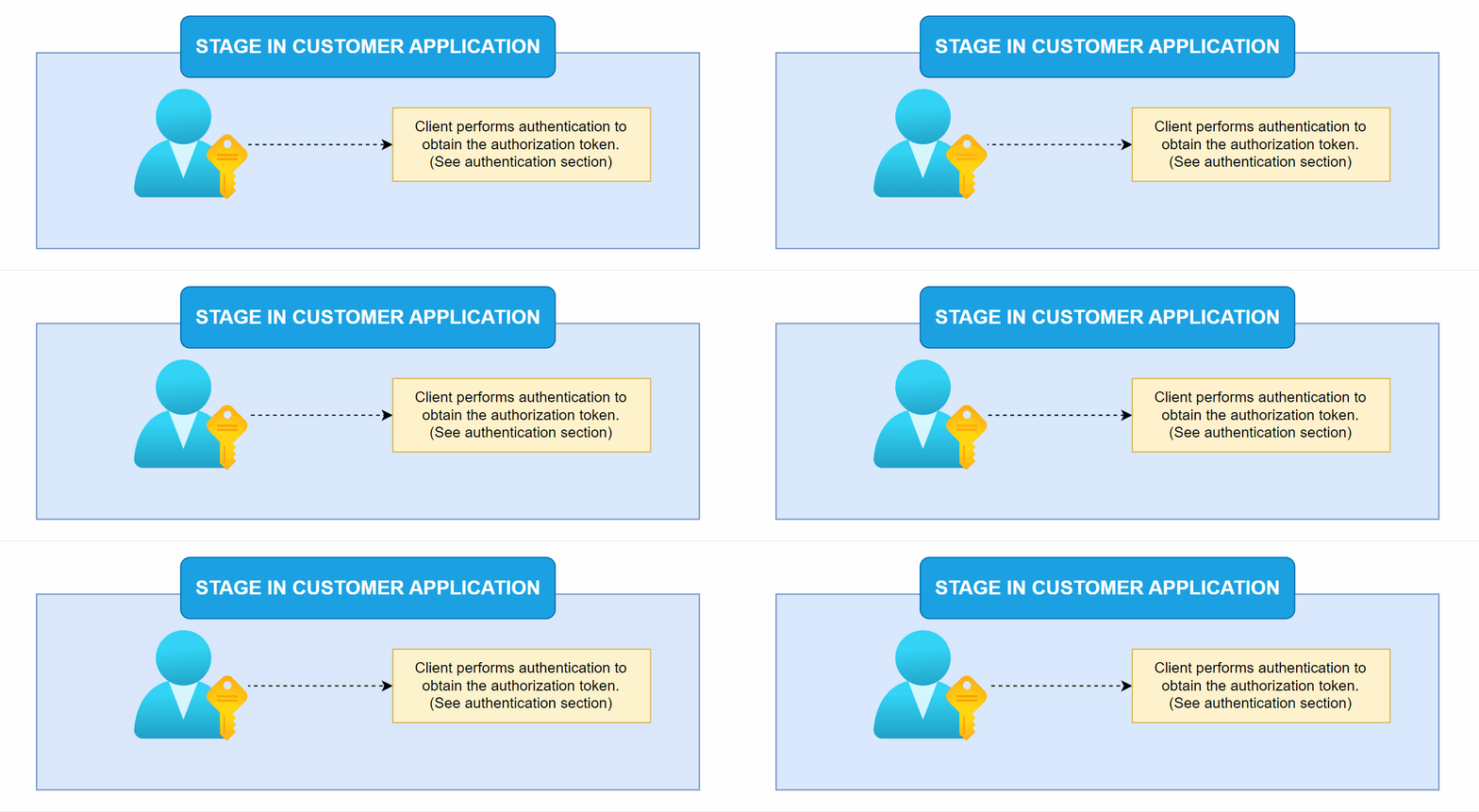
The first step to be performed in the client application is authentication using the
/restServerLogin method. This step is essential because this key (token) allows the
Signosoft server to permit the document upload.
This token will also be necessary for any other method in the future.
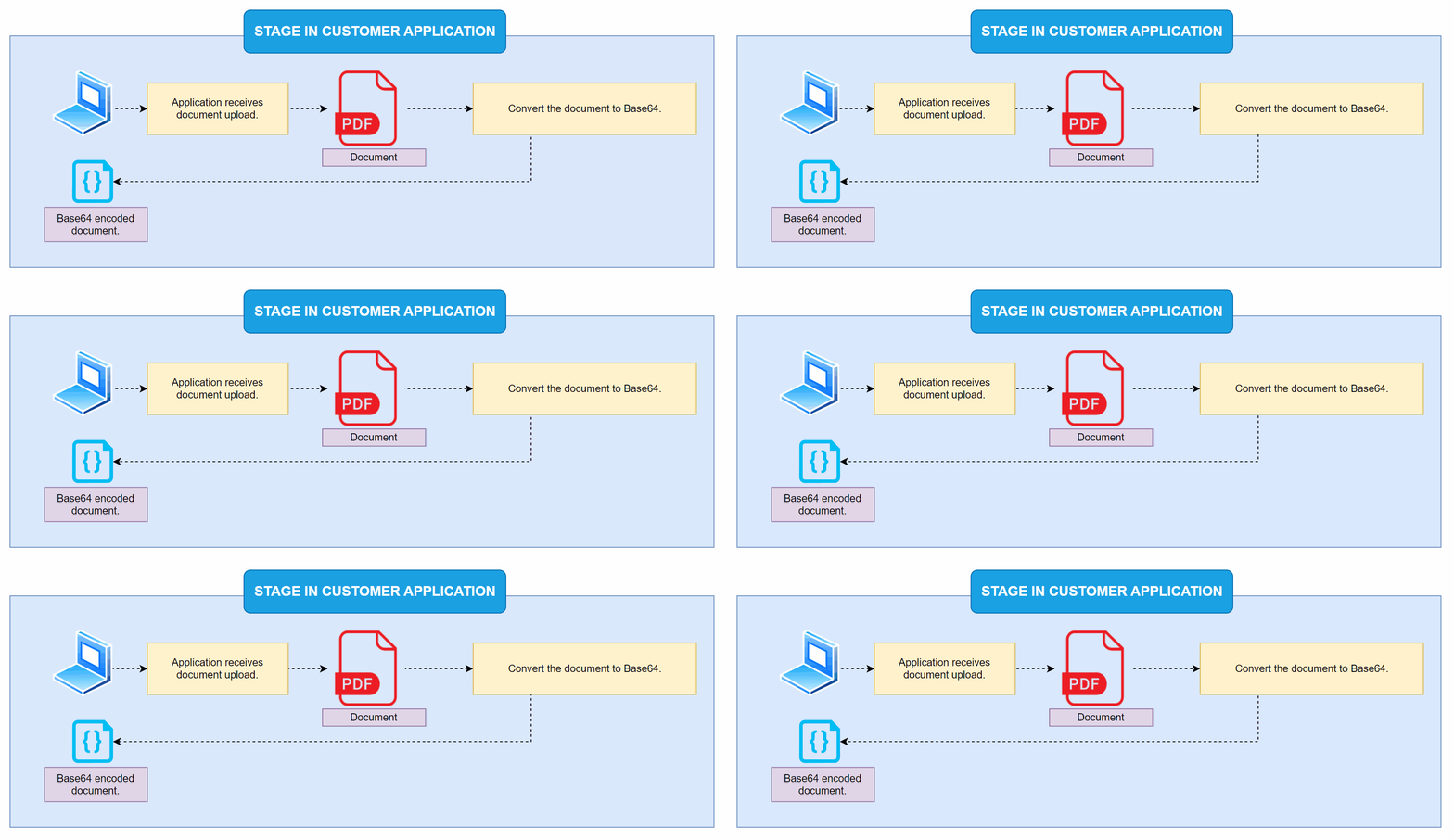
The second step is the document upload that will be used for signing. Any upload method can be
used by the client (a file input field, for example).
After the upload, the client application must encode this file in Base64. Most technologies have
built-in resources for this, for example, in JavaScript, you can use the FileReader
function.
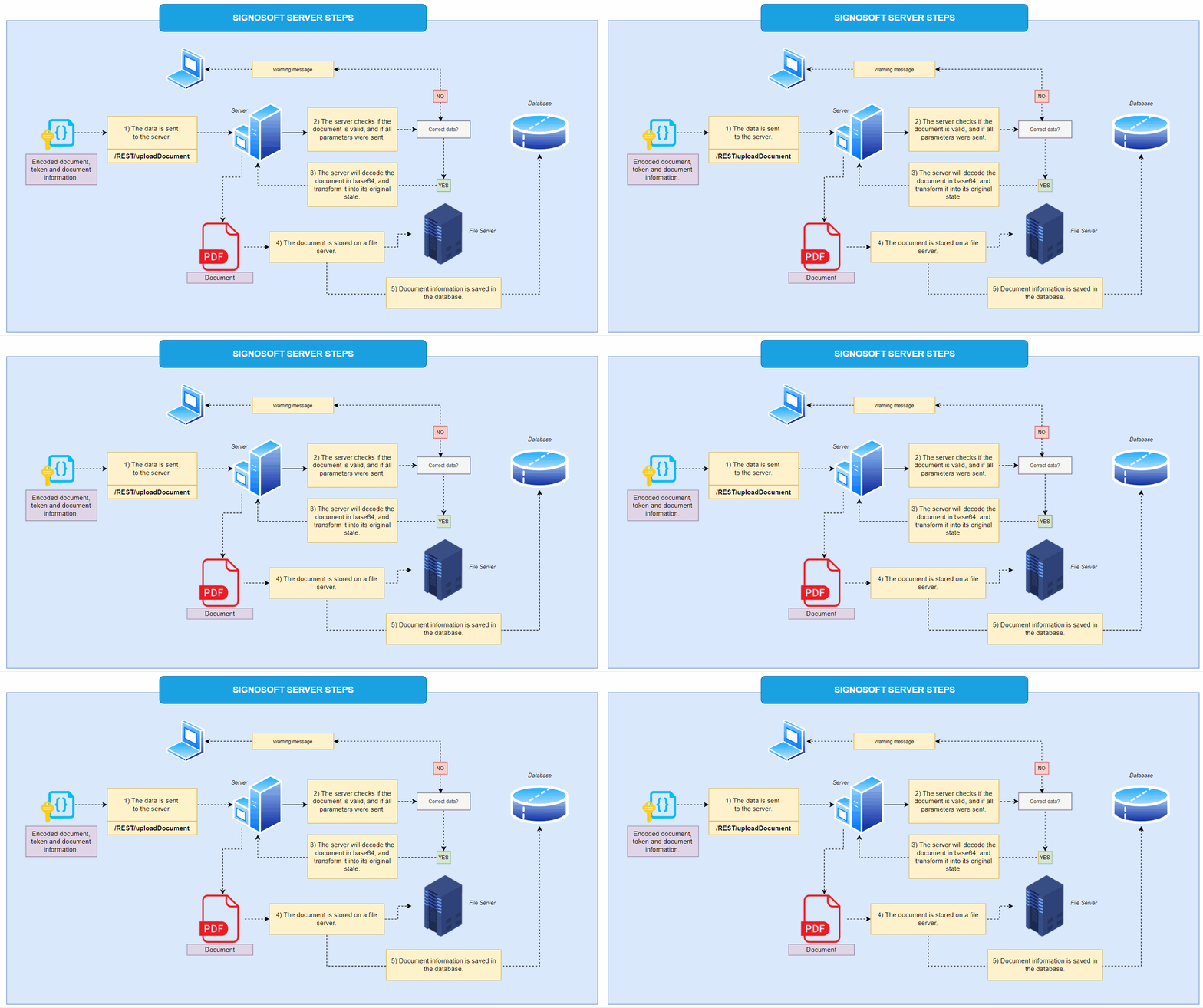
With the authorization token in hand and the file encoded, simply call the /REST/uploadDocument
route and provide the required and optional data (such as name, owner, etc.).
The request is sent to the Signosoft server, which will verify if all parameters are met (in this
process, the token is sent) and if the encoded document is valid. If there is any issue,
the server will return a message to the client application, informing what happened. If everything
is correct, the server will decode the document and store it in a specific location for documents.
At the same time, the information is saved in the database, and the server sends a success message
to the client application.
Parameters
To perform the request, some parameters are mandatory while others are optional. See the list below:
- docData – String – This is the document you want to upload, encoded in BASE64 format. It must be a PDF. Required
- docOwner – String – This is the email of the user who owns or created the document. Required
- documentName – String – This is the name of the document that will be shown during the signing process. Required
- applicationMode – String – This specifies if users can modify the signature fields in the document. It can be either ‘SIGN’ or ‘EDIT’. If not provided, it defaults to “EDIT“. In EDIT mode, users can change document fields (like the size and position of the signature field) before sending it for signing. In SIGN mode, users can only fill out existing fields and sign the document without making any changes. Optional
- commands – JSON – Additional information related to the document, formatted as a JSON object. Optional
- docExtension – String – If your document is not a PDF, you can use this parameter to specify its format. The Signosoft server can convert it if configured properly. Optional
- deadline – Long – This is the expiration date and time for the document, in Unix timestamp format (epoch). Optional
- attachments – JSON – A JSON object that contains data and metadata about any documents attached to the document you're uploading for signature. Optional
-
parameters – String – A string of parameters separated by semicolons
(‘;’). Each parameter value is separated by a vertical bar (‘|’). These parameters define various
fields and properties for the document. Here are some key ones:
- type – Type of the field to be added, possible values include SIGNATURE, TEXT, CHECKBOX, RADIOBUTTON, ALLSIGNATURE.
- subtype – Optional for type=SIGNATURE. If not specified, it defaults to ‘biometric’. Other options are ‘click-to-sign’, ‘one-time-password’, ‘bank-id’, ‘bank-id-sign’, and ‘sms-password’.
- name – Name of the field. It is used to group selection buttons such as checkboxes and radio buttons. For example, each radio button that shares the same name is treated as part of a single group, allowing the user to select only one option within that group.
- lookup – Text to search for in the document to use as an anchor for positioning fields.
- offsetX – X offset from the anchor's bottom left corner, as a percentage of the page width.
- offsetY – Y offset from the anchor's bottom left corner, as a percentage of the page height.
- page – Page number where the field will be placed, starting from 1.
- positionX – X position of the field on the page, as a percentage of the page width.
- positionY – Y position of the field on the page, as a percentage of the page height.
- width – Width of the field, as a percentage of the page width.
- height – Height of the field, as a percentage of the page height.
- order – The order in which fields should be filled or signed.
- required – Indicates if the field is mandatory.
- signerlogin – Signer’s login information.
- signerfirstname – Signer’s first name.
- signersecondname – Signer’s second name.
- signerpassword – Extra password for the signer, used with the one-time-password subtype.
- signerphone – Phone number of the signer for sms-password subtype.
- value – Prefilled value for a text field.
- inperson – Indicates if the signature is in-person. If true, the signer doesn't need to be defined and is not notified by email.
- disableNotifications – If true, disables all email notifications about the document.
- commands – Additional information related to the signature.
- bgcolor – Background color of the signature image in hexadecimal format (e.g., “#f2f2f2”).
- image – Base64 encoded image for the signature.
- selected – Used to indicate whether a field is selected. Its possible values are true or false.
How to implement
In the example below, a simple upload is done, with the mandatory parameters.
import java.io.File;
import java.io.IOException;
import java.nio.file.Files;
import java.nio.charset.StandardCharsets;
import java.net.URI;
import java.net.http.HttpClient;
import java.net.http.HttpRequest;
import java.net.http.HttpResponse;
import java.util.Base64;
import java.util.HashMap;
import java.util.Map;
import java.net.URLEncoder;
import java.net.http.HttpRequest.BodyPublishers;
import org.json.JSONObject;

public class UploadDocument {

    public static void main(String[] args) throws IOException, InterruptedException {
        String login = "username";
        String password = "password";
        File pdfFile = new File("path/to/your/file.pdf");
        String documentName = "document_name.pdf";
        String docOwner = "email@example.com";

        // Authenticate and get token
        String token = authenticate(login, password);

        // Upload the document
        uploadDocument(pdfFile, documentName, docOwner, token);
    }

    // Function to authenticate and get token
    private static String authenticate(String login, String password) throws IOException, InterruptedException {
        HttpClient client = HttpClient.newHttpClient();
        Map data = new HashMap<>();
        data.put("login", login);
        data.put("password", password);

        HttpRequest request = HttpRequest.newBuilder()
                .uri(URI.create("http://context/api/restServerLogin"))
                .header("Content-Type", "application/x-www-form-urlencoded")
                .POST(ofFormData(data))
                .build();

        HttpResponse response = client.send(request, HttpResponse.BodyHandlers.ofString());

        // Extract token from JSON response
        JSONObject jsonObject = new JSONObject(response.body());
        return jsonObject.getString("token");
    }

    // Function to upload document
    private static void uploadDocument(File pdfFile, String documentName, String docOwner, String token) throws IOException, InterruptedException {
        // Convert PDF to Base64
        byte[] fileContent = Files.readAllBytes(pdfFile.toPath());
        String encodedString = Base64.getEncoder().encodeToString(fileContent);

        // Prepare data for POST request
        Map data = new HashMap<>();
        data.put("docData", encodedString);
        data.put("documentName", documentName);
        data.put("docOwner", docOwner);

        // Send POST request to upload document
        HttpClient client = HttpClient.newHttpClient();
        HttpRequest request = HttpRequest.newBuilder()
                .uri(URI.create("http://context/api/REST/uploadDocument"))
                .header("Content-Type", "application/x-www-form-urlencoded")
                .header("Authorization", "Bearer " + token)
                .POST(ofFormData(data))
                .build();

        HttpResponse response = client.send(request, HttpResponse.BodyHandlers.ofString());

        // Print response
        System.out.println(response.body());
    }

    // Helper function to convert form data to x-www-form-urlencoded format
    private static HttpRequest.BodyPublisher ofFormData(Map data) {
        StringBuilder builder = new StringBuilder();
        for (Map.Entry entry : data.entrySet()) {
            if (builder.length() > 0) {
                builder.append("&");
            }
            builder.append(URLEncoder.encode(entry.getKey().toString(), StandardCharsets.UTF_8));
            builder.append("=");
            builder.append(URLEncoder.encode(entry.getValue().toString(), StandardCharsets.UTF_8));
        }
        return BodyPublishers.ofString(builder.toString());
    }
}
import requests
import base64

def authenticate(login, password):
    """
    Authenticate the user and return the authentication token.
    """
    url = "http://context/api/restServerLogin"
    payload = {'login': login, 'password': password}
    headers = {'Content-Type': 'application/x-www-form-urlencoded'}

    response = requests.post(url, data=payload, headers=headers)
    response.raise_for_status()  # Raise an error for bad status codes
    token = response.json().get("token")

    return token

def upload_document(file_path, document_name, doc_owner, token):
    """
    Upload a PDF document encoded in Base64.
    """
    # Read and encode the PDF file in Base64
    with open(file_path, "rb") as pdf_file:
        encoded_string = base64.b64encode(pdf_file.read()).decode('utf-8')

    payload = {
        'docData': encoded_string,
        'documentName': document_name,
        'docOwner': doc_owner
    }

    headers = {
        'Content-Type': 'application/x-www-form-urlencoded',
        'Authorization': f'Bearer {token}'
    }

    # Send POST request to upload the document
    response = requests.post("http://context/api/REST/uploadDocument", data=payload, headers=headers)
    response.raise_for_status()
    print(response.text)

if __name__ == "__main__":
    login = "username"
    password = "password"
    file_path = "path/to/your/file.pdf"
    document_name = "document_name.pdf"
    doc_owner = "email@example.com"

    # Authenticate and get the token
    token = authenticate(login, password)

    # Upload the document
    upload_document(file_path, document_name, doc_owner, token)
  <?php
  function authenticate($login, $password) {
    // Authenticate the user and return the authentication token
    $url = "http://context/api/restServerLogin";
    $data = http_build_query(array('login' => $login, 'password' => $password));

    $options = array(
        'http' => array(
            'header'  => "Content-Type: application/x-www-form-urlencoded\r\n",
            'method'  => 'POST',
            'content' => $data,
        ),
    );
    $context  = stream_context_create($options);
    $response = file_get_contents($url, false, $context);

    if ($response === FALSE) {
        die('Error');
    }

    $responseData = json_decode($response, true);
    return $responseData['token'];
}

function uploadDocument($filePath, $documentName, $docOwner, $token) {
    // Upload a PDF document encoded in Base64
    $url = "http://context/api/REST/uploadDocument";

    // Read and encode the PDF file in Base64
    $pdfContent = file_get_contents($filePath);
    $encodedString = base64_encode($pdfContent);

    $data = http_build_query(array(
        'docData' => $encodedString,
        'documentName' => $documentName,
        'docOwner' => $docOwner
    ));

    $options = array(
        'http' => array(
            'header'  => "Content-Type: application/x-www-form-urlencoded\r\n" .
                         "Authorization: Bearer $token\r\n",
            'method'  => 'POST',
            'content' => $data,
        ),
    );
    $context  = stream_context_create($options);
    $response = file_get_contents($url, false, $context);

    if ($response === FALSE) {
        die('Error');
    }

    echo $response;
}

$login = "username";
$password = "password";
$filePath = "path/to/your/file.pdf";
$documentName = "document_name.pdf";
$docOwner = "email@example.com";

// Authenticate and get the token
$token = authenticate($login, $password);

// Upload the document
uploadDocument($filePath, $documentName, $docOwner, $token);
  ?>
package main

import (
    "bytes"
    "encoding/base64"
    "encoding/json"
    "fmt"
    "io/ioutil"
    "net/http"
    "net/url"
    "os"
)

func authenticate(login, password string) (string, error) {
    // Authenticate the user and return the authentication token
    data := url.Values{}
    data.Set("login", login)
    data.Set("password", password)

    resp, err := http.PostForm("http://context/api/restServerLogin", data)
    if err != nil {
        return "", err
    }
    defer resp.Body.Close()

    if resp.StatusCode != http.StatusOK {
        return "", fmt.Errorf("failed to authenticate: %s", resp.Status)
    }

    var result map[string]string
    if err := json.NewDecoder(resp.Body).Decode(&result); err != nil {
        return "", err
    }

    return result["token"], nil
}

func uploadDocument(filePath, documentName, docOwner, token string) error {
    // Upload a PDF document encoded in Base64
    fileContent, err := ioutil.ReadFile(filePath)
    if err != nil {
        return err
    }

    // Encode the PDF file in Base64
    encodedString := base64.StdEncoding.EncodeToString(fileContent)

    data := url.Values{}
    data.Set("docData", encodedString)
    data.Set("documentName", documentName)
    data.Set("docOwner", docOwner)

    req, err := http.NewRequest("POST", "http://context/api/REST/uploadDocument", bytes.NewBufferString(data.Encode()))
    if err != nil {
        return err
    }

    req.Header.Set("Content-Type", "application/x-www-form-urlencoded")
    req.Header.Set("Authorization", "Bearer "+token)

    client := &http.Client{}
    resp, err := client.Do(req)
    if err != nil {
        return err
    }
    defer resp.Body.Close()

    if resp.StatusCode != http.StatusOK {
        return fmt.Errorf("failed to upload document: %s", resp.Status)
    }

    body, _ := ioutil.ReadAll(resp.Body)
    fmt.Println(string(body))

    return nil
}

func main() {
    login := "username"
    password := "password"
    filePath := "path/to/your/file.pdf"
    documentName := "document_name.pdf"
    docOwner := "email@example.com"

    // Authenticate and get the token
    token, err := authenticate(login, password)
    if err != nil {
        fmt.Println("Error authenticating:", err)
        return
    }

    // Upload the document
    if err := uploadDocument(filePath, documentName, docOwner, token); err != nil {
        fmt.Println("Error uploading document:", err)
        return
    }
}
Returns
When the document loads correctly, it returns a status code of 200, providing some important information, for example:
{
    "uploadResult": "OK",
    "document": {
        "docid": 13175,
        "docowner": "test@test.com",
        "docdeadline": 0,
        "docstate": "New",
        "docsize": 270804,
        "docMode": "EDIT",
        "docname": "document_name",
        "doctoken": "4dc0faa7-0434-4e3e-8e2a-4451ddac688d_1717644167527"
    },
    "signatures": []
}
- uploadResult – String – Result of the upload operation.
- docid – Integer – ID of the document.
- docowner – String – Email of the document owner.
- docdeadline – Long – Deadline of the document in UNIX format.
- docstate – String – State of the document.
- docsize – Integer – Size of the document in bytes.
- docMode – String – Mode of the document (e.g., EDIT).
- docname – String – Name of the document.
- doctoken – String – Token associated with the document.
- signatures – Array – List of signatures associated with the document.
What if it was necessary to create a document with more than one signer, using different methods?
To add multiple subscribers to an upload, with different methods, simply use the
parameters option.
This parameter receives a string, where each created field (whether a signature, checkbox or text
field) must be separated
by ";", and each option within a created field must be separated by "|". It may seem confusing, but
you will find that
implementing this feature is simple. Let's look at a practical example.
Imagine that you want to send a document to three people to sign in different ways. Imagine that
this document has two pages, and the signatures should be on the last page next to each other.
Filip - Will sign in a common way, using the biometric option.
Name: Filip Smith
Email: fpsmith@company.com
Carl - You will sign using a unique password.
Name: Carl Johnson
Email: carljsn@company.com
Paul - Will sign with a cell phone token.
Name: Paul David
Email: pauldavid@company.com
Telephone: (420) 776 647 547
You can create four types of fields as shown in the image below. The "signature" type has six
subtypes that must be
specified when creating a signature field. If you do not specify, the "biometric"
option will be selected by default.
For each signature subtype, there are other options that you can find in the "MORE OPTIONS
FOR SIGNATURE" box. In the "OTHERS" box,
there are options that can be applied to other types of fields, such as position, order, height,
among others.

See what the parameters for the Filip:
parameters: "type=signature|signerlogin=fpsmith@company.com|signerfirstname=Filip|signersecondname=Smith|page=2|positionY=80|positionX=20|required=true"
See what the parameters for the Carl:
parameters: "type=signature|subtype=one-time-password|signerlogin=carljsn@company.com|signerfirstname=Carl|signersecondname=Johnson|page=2|positionY=80|positionX=40|required=true|signerpassword=123456"
See what the parameters for the Carl:
parameters: "type=signature|subtype=sms-password|signerlogin=pauldavid@company.com|signerfirstname=Paul|signersecondname=David|page=2|positionY=80|positionX=60|required=true|signerphone=420776647547"
To upload a document and add multiple signers with different signature methods, you must join all the parameters into a single string, separating each parameter with ";". This will be the end result
                  parameters: "type=signature|signerlogin=fpsmith@company.com|signerfirstname=Filip|signersecondname=Smith|page=2|positionY=80|positionX=20|required=true;
type=signature|subtype=one-time-password|signerlogin=carljsn@company.com|signerfirstname=Carl|signersecondname=Johnson|page=2|positionY=80|positionX=40|required=true|signerpassword=123456;
type=signature|subtype=sms-password|signerlogin=pauldavid@company.com|signerfirstname=Paul|signersecondname=David|page=2|positionY=80|positionX=60|required=true|signerphone=420776647547"
Download documents
Description
After uploading documents, you must later download these documents. It's very simple to download documents: just specify the document token and, within a few seconds, the document will be available.
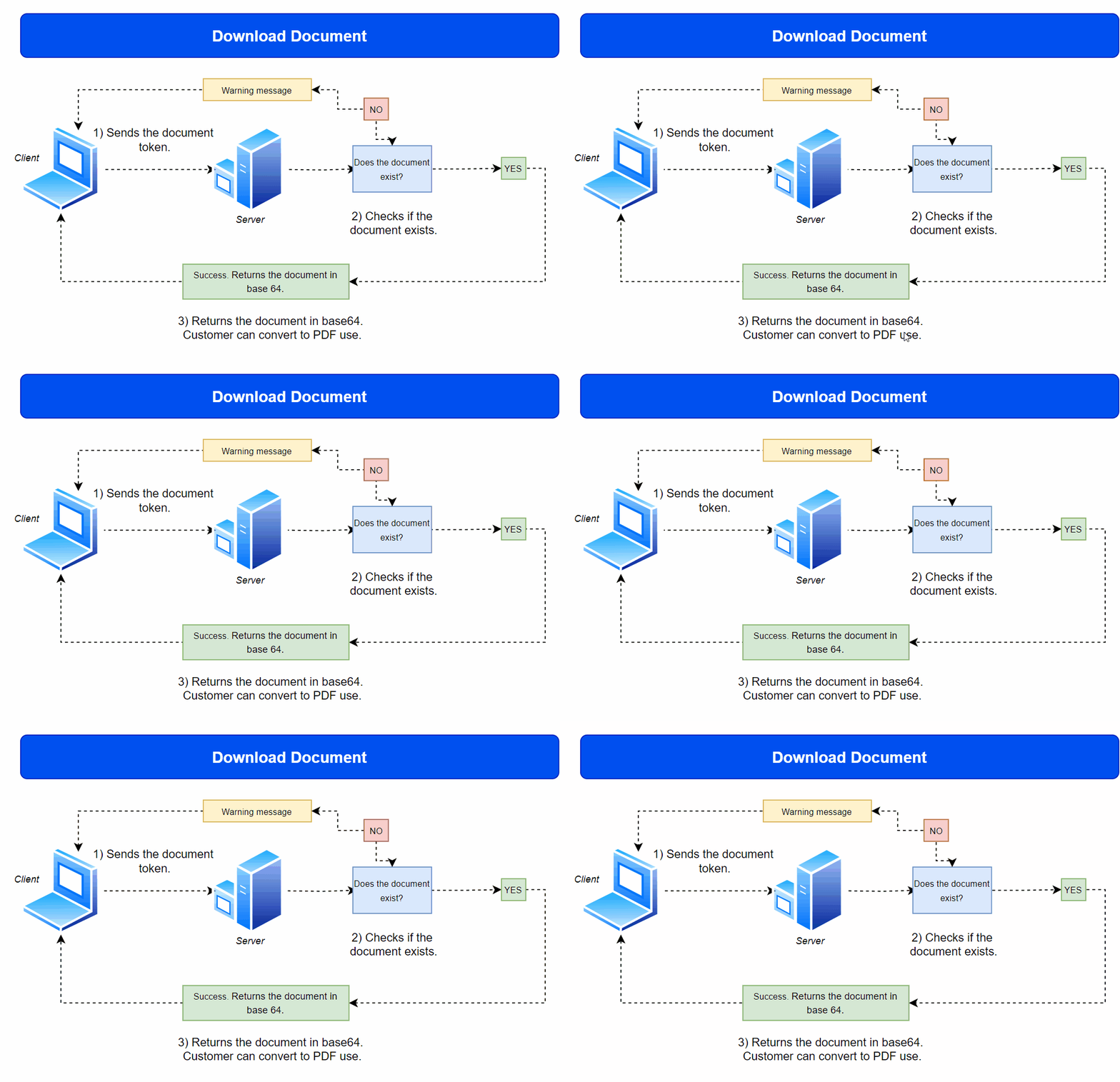
The download process is basically the same as the upload, but simpler. See how it works:
1) The application specifies the document token, with the other parameters (in the parameters
section).
2) The server checks the authorization token and whether the document exists.
3) If everything is ok, the server will return the document in base64. The client application can
convert base64 to the original format for necessary actions.
Parameters
To perform the request, some parameters are mandatory. See the list below:
- docToken – String – The token is generated when the document is sent to the server, and is used to specifically reference that document for future operations, such as downloading.
- flattened – Boolean – When set to 'true', the document will be flattened, meaning it will be stripped of all editable objects, including biometric data. This is typically done to prevent future editing or to protect sensitive information.
- lock – Boolean – When set to 'true', the document will be password protected. However, if the document is already signed, it cannot be locked as the locking mechanism would invalidate the existing signature. In other words, you can only password protect documents that have not been electronically signed.
- toFile – Boolean – When toFile is set to false, it indicates that the document download request was made by an external system, possibly through an API or integration with another service.
How to implement
In the example below, a simple upload is done, with the mandatory parameters.
import java.io.IOException;
import java.net.URI;
import java.net.http.HttpClient;
import java.net.http.HttpRequest;
import java.net.http.HttpResponse;
import java.net.URLEncoder;
import java.nio.charset.StandardCharsets;
import java.util.HashMap;
import java.util.Map;

public class DownloadDocument {

    public static void main(String[] args) throws IOException, InterruptedException {
        String docToken = "TOKEN_DOCUMENT";
        String flattened = "true";
        String lock = "false";
        String toFile = "false";

        // Authenticate and get token (you need to implement this part)
        String token = "••••••"; // Replace with your actual authentication token

        // Execute the document download
        downloadDocument(docToken, flattened, lock, toFile, token);
    }

    // Function to download document
    private static void downloadDocument(String docToken, String flattened, String lock, String toFile, String token) throws IOException, InterruptedException {
        HttpClient client = HttpClient.newHttpClient();

        // Prepare data for POST request
        Map<String, String> data = new HashMap<>();
        data.put("docToken", docToken);
        data.put("flattened", flattened);
        data.put("lock", lock);
        data.put("toFile", toFile);

        HttpRequest request = HttpRequest.newBuilder()
                .uri(URI.create("https://test.signosoft.com/api/REST/downloadDoc"))
                .header("Content-Type", "application/x-www-form-urlencoded")
                .header("Authorization", "Bearer " + token) // Include Authorization header with Bearer token
                .POST(ofFormData(data))
                .build();

        HttpResponse<String> response = client.send(request, HttpResponse.BodyHandlers.ofString());

        // Print response
        System.out.println(response.body());
    }

    // Helper function to convert form data to x-www-form-urlencoded format
    private static HttpRequest.BodyPublisher ofFormData(Map<String, String> data) {
        StringBuilder builder = new StringBuilder();
        for (Map.Entry<String, String> entry : data.entrySet()) {
            if (builder.length() > 0) {
                builder.append("&");
            }
            builder.append(URLEncoder.encode(entry.getKey(), StandardCharsets.UTF_8));
            builder.append("=");
            builder.append(URLEncoder.encode(entry.getValue(), StandardCharsets.UTF_8));
        }
        return HttpRequest.BodyPublishers.ofString(builder.toString());
    }
}
import requests

def download_document():
    url = 'https://test.signosoft.com/api/REST/downloadDoc'
    doc_token = 'TOKEN_DOCUMENT'
    flattened = 'true'
    lock = 'false'
    to_file = 'false'
    token = '••••••'  # Replace with your actual authentication token

    params = {
        'docToken': doc_token,
        'flattened': flattened,
        'lock': lock,
        'toFile': to_file
    }

    headers = {
        'Authorization': 'Bearer ' + token,
        'Content-Type': 'application/x-www-form-urlencoded'
    }

    response = requests.post(url, headers=headers, data=params)
    print(response.text)

download_document()
<?php
function downloadDocument() {
  $url = 'https://signosoft.com/api/REST/downloadDoc';
  $docToken = 'TOKEN_DOCUMENT';
  $flattened = 'true';
  $lock = 'false';
  $toFile = 'false';
  $token = '••••••'; // Replace with your actual authentication token

  $data = array(
      'docToken' => $docToken,
      'flattened' => $flattened,
      'lock' => $lock,
      'toFile' => $toFile
  );

  $headers = array(
      'Authorization: Bearer ' . $token,
      'Content-Type: application/x-www-form-urlencoded'
  );

  $options = array(
      'http' => array(
          'header' => implode("\r\n", $headers),
          'method' => 'POST',
          'content' => http_build_query($data)
      )
  );

  $context = stream_context_create($options);
  $result = file_get_contents($url, false, $context);

  if ($result === FALSE) {
      echo "Error";
  } else {
      echo $result;
  }
}

downloadDocument();n);
  ?>
package main

import (
    "fmt"
    "net/http"
    "net/url"
)

func main() {
    downloadDocument()
}

func downloadDocument() {
    url := "https://test.signosoft.com/api/REST/downloadDoc"
    docToken := "TOKEN_DOCUMENT"
    flattened := "true"
    lock := "false"
    toFile := "false"
    token := "••••••" // Replace with your actual authentication token

    data := url.Values{}
    data.Set("docToken", docToken)
    data.Set("flattened", flattened)
    data.Set("lock", lock)
    data.Set("toFile", toFile)

    req, err := http.NewRequest("POST", url, nil)
    if err != nil {
        fmt.Println("Error creating request:", err)
        return
    }

    req.Header.Set("Authorization", "Bearer "+token)
    req.Header.Set("Content-Type", "application/x-www-form-urlencoded")

    req.URL.RawQuery = data.Encode()

    client := &http.Client{}
    resp, err := client.Do(req)
    if err != nil {
        fmt.Println("Error sending request:", err)
        return
    }
    defer resp.Body.Close()

    fmt.Println("Response Status:", resp.Status)

    // Print response body
    buf := make([]byte, 1024)
    for {
        n, err := resp.Body.Read(buf)
        if n == 0 || err != nil {
            break
        }
        fmt.Print(string(buf[:n]))
    }
}
Returns
This will be the return for both requests above:
{
  "flattened": true,
  "docName": "NAME_DOCUMENT",
  "downloadDocResult": "OK",
  "locked": false,
  "docData": "JVBERi0xLjcKJfbk/N8KMSAwIG9iago8PAovUGFnZXMgMiAwIFIKL1R5cGUgL0NhdGFsb2cKL1ZpZXdlclByZWZlcmVuY2VzIDw8Ci9EaXJlY3Rpb24gL0wyUgo+PgovQWNyb0Zvcm0gMyAwIFIKPj4KZW5kb2JqCjQgMCBvYmoKPDwKL0NyZWF0aW9uRGF0ZSAoRDoyMDI0MDcwMjA5Mzc1MikKL0NyZWF0b3..."
}
See that the request returns are the same parameters informed in the request.
Delete documents
Description
It is very simple to delete documents from the server. Just specify the tokens of the documents you want to delete, and they will be deleted.
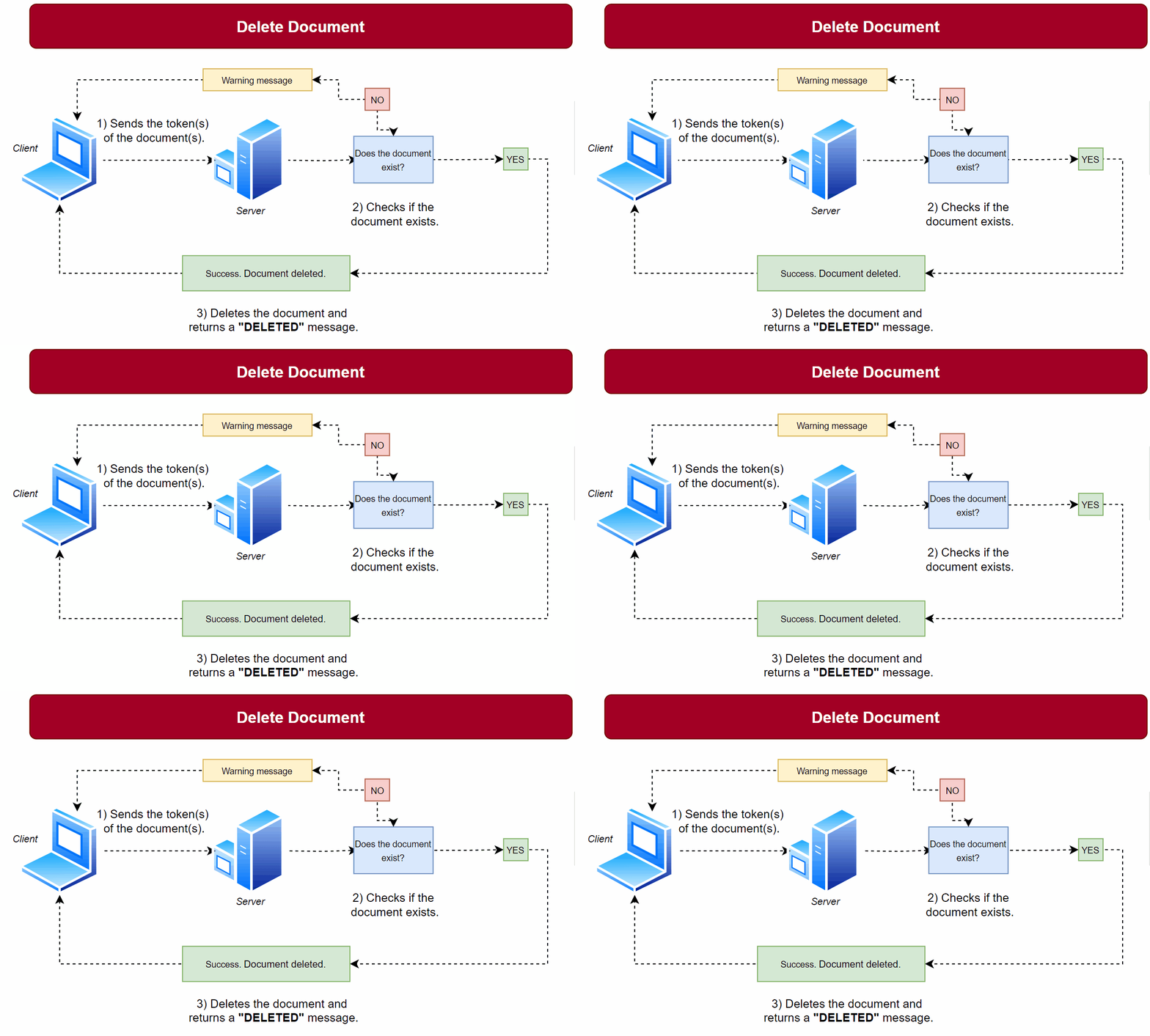
Tokens must be passed inside "[]", separated by a comma. Even if you are only going to delete one document, you must follow this pattern.
Parameters
To perform the request, the following parameter is mandatory:
-
docTokens – String – A JSON array string containing the tokens of the
documents or contracts you want to delete. Each token uniquely identifies a document or contract
on the server. For example:
[“4819d2d0-c8d5-41d6-bc66-7832bc5806d4”, “4819d2d0-c8d5-41d6-bc66-7832bc5806d5”]
How to implement
import java.io.IOException;
import java.net.URI;
import java.net.http.HttpClient;
import java.net.http.HttpRequest;
import java.net.http.HttpResponse;
import java.net.URLEncoder;
import java.nio.charset.StandardCharsets;
import java.util.HashMap;
import java.util.Map;

public class DeleteDocuments {

    public static void main(String[] args) throws IOException, InterruptedException {
        String docTokens = "[\"71ae7c01-1c66-483a-b5a9-f68a20449555_1719417913870\", \"bab1fb1b-f0f6-4a8b-b1c2-ef0197ce2096_1719941381403\"]";
        String token = "••••••"; // Replace with your actual authentication token

        // Execute the document deletion
        deleteDocuments(docTokens, token);
    }

    // Function to delete documents
    private static void deleteDocuments(String docTokens, String token) throws IOException, InterruptedException {
        HttpClient client = HttpClient.newHttpClient();

        // Prepare data for POST request
        Map<String, String> data = new HashMap<>();
        data.put("docTokens", docTokens);

        HttpRequest request = HttpRequest.newBuilder()
                .uri(URI.create("https://test.signosoft.com/api/REST/deleteDocument"))
                .header("Content-Type", "application/x-www-form-urlencoded")
                .header("Authorization", "Bearer " + token) // Include Authorization header with Bearer token
                .POST(ofFormData(data))
                .build();

        HttpResponse<String> response = client.send(request, HttpResponse.BodyHandlers.ofString());

        // Print response
        System.out.println(response.body());
    }

    // Helper function to convert form data to x-www-form-urlencoded format
    private static HttpRequest.BodyPublisher ofFormData(Map<String, String> data) {
        StringBuilder builder = new StringBuilder();
        for (Map.Entry<String, String> entry : data.entrySet()) {
            if (builder.length() > 0) {
                builder.append("&");
            }
            builder.append(URLEncoder.encode(entry.getKey(), StandardCharsets.UTF_8));
            builder.append("=");
            builder.append(URLEncoder.encode(entry.getValue(), StandardCharsets.UTF_8));
        }
        return HttpRequest.BodyPublishers.ofString(builder.toString());
    }
}
import requests

def delete_documents():
    url = 'https://signosoft.com/api/REST/deleteDocument'
    doc_tokens = '["71ae7c01-1c66-483a-b5a9-f68a20449555_1719417913870", "bab1fb1b-f0f6-4a8b-b1c2-ef0197ce2096_1719941381403"]'
    token = '••••••'  # Replace with your actual authentication token

    params = {
        'docTokens': doc_tokens
    }

    headers = {
        'Authorization': 'Bearer ' + token,
        'Content-Type': 'application/x-www-form-urlencoded'
    }

    response = requests.post(url, headers=headers, data=params)
    print(response.text)

delete_documents()
  <?php
  function deleteDocuments() {
    $url = 'https://test.signosoft.com/api/REST/deleteDocument';
    $docTokens = '["71ae7c01-1c66-483a-b5a9-f68a20449555_1719417913870", "bab1fb1b-f0f6-4a8b-b1c2-ef0197ce2096_1719941381403"]';
    $token = '••••••'; // Replace with your actual authentication token

    $data = array(
        'docTokens' => $docTokens
    );

    $headers = array(
        'Authorization: Bearer ' . $token,
        'Content-Type: application/x-www-form-urlencoded'
    );

    $options = array(
        'http' => array(
            'header' => implode("\r\n", $headers),
            'method' => 'POST',
            'content' => http_build_query($data)
        )
    );

    $context = stream_context_create($options);
    $result = file_get_contents($url, false, $context);

    if ($result === FALSE) {
        echo "Error";
    } else {
        echo $result;
    }
  }

  deleteDocuments();
  ?>
package main

import (
    "fmt"
    "net/http"
    "net/url"
    "strings"
)

func main() {
    deleteDocuments()
}

func deleteDocuments() {
    urlStr := "https://test.signosoft.com/api/REST/deleteDocument"
    docTokens := `["71ae7c01-1c66-483a-b5a9-f68a20449555_1719417913870", "bab1fb1b-f0f6-4a8b-b1c2-ef0197ce2096_1719941381403"]`
    token := "••••••" // Replace with your actual authentication token

    data := url.Values{}
    data.Set("docTokens", docTokens)

    req, err := http.NewRequest("POST", urlStr, strings.NewReader(data.Encode()))
    if err != nil {
        fmt.Println("Error creating request:", err)
        return
    }

    req.Header.Set("Authorization", "Bearer "+token)
    req.Header.Set("Content-Type", "application/x-www-form-urlencoded")

    client := &http.Client{}
    resp, err := client.Do(req)
    if err != nil {
        fmt.Println("Error sending request:", err)
        return
    }
    defer resp.Body.Close()

    fmt.Println("Response Status:", resp.Status)

    // Print response body
    buf := make([]byte, 1024)
    for {
        n, err := resp.Body.Read(buf)
        if n == 0 || err != nil {
            break
        }
        fmt.Print(string(buf[:n]))
    }
}
Returns
{
  "deleteResult": "DELETED",
  "deleteResults": [
    {
      "token": "71ae7c01-1c66-483a-b5a9-f68a20449555_1719417913870",
      "status": "DELETED"
    },
    {
      "token": "bab1fb1b-f0f6-4a8b-b1c2-ef0197ce2096_1719941381403",
      "status": "DELETED"
    }
  ]
}
Get documents by token
Description
It is often necessary to search for complete information about a given document, such as who the
owner is, who the signers are,
and the status of the document (if it has already been signed or is waiting). All this information
for a given document can be
obtained using the getDocumentByToken route.
This route does not download the document itself; she is responsible for providing complete document information.
Imagine that you want to implement a functionality in your system and, for some reason, you need
to know if the document was signed
by all signatories. Using this route, you receive a docstate attribute, which
indicates the state of the document. If signed,
the attribute will contain SIGNED.
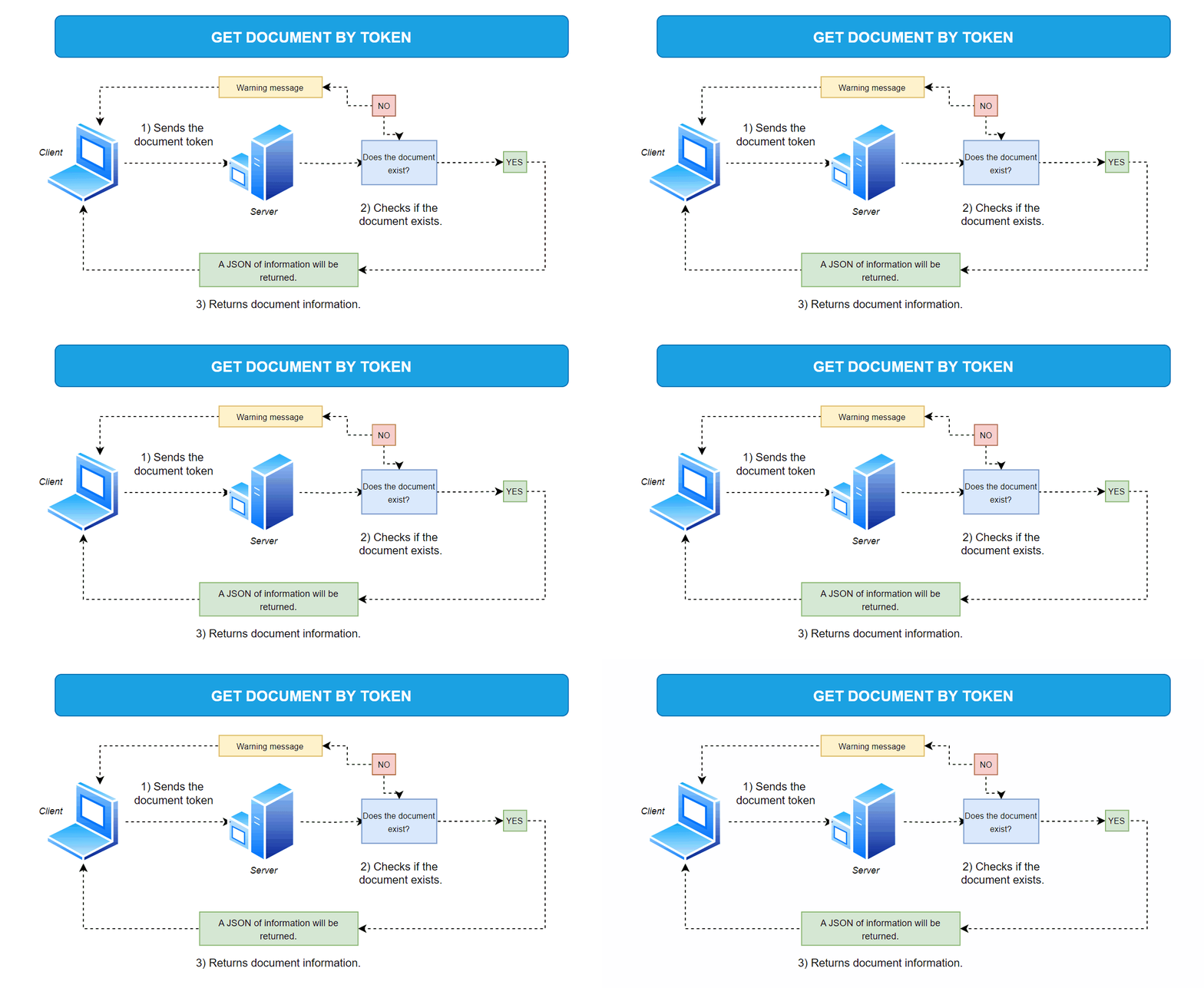
Parameters
To perform the request, the following parameter is mandatory:
- doctoken – String – This is the unique identification token of the document. You receive this token when you upload the document to the server.
How to implement
import java.io.IOException;
import java.net.URI;
import java.net.http.HttpClient;
import java.net.http.HttpRequest;
import java.net.http.HttpResponse;

public class GetDocumentByToken {

    public static void main(String[] args) throws IOException, InterruptedException {
        String docToken = "151ec53b-2aa2-40ac-abb5-fec96e425e03_1720032817699";
        String token_auth = "••••••";

        getDocumentByToken(docToken, token_auth);
    }

    // Function to get document by token
    private static void getDocumentByToken(String docToken, String token) throws IOException, InterruptedException {
        HttpClient client = HttpClient.newHttpClient();

        String url = "https://signosoft.com/api/REST/getDocumentByToken?doctoken=" + docToken;

        HttpRequest request = HttpRequest.newBuilder()
                .uri(URI.create(url))
                .header("accept", "application/json;charset=UTF-8")
                .header("Authorization", "Bearer " + token_auth)
                .POST(HttpRequest.BodyPublishers.noBody())
                .build();

        HttpResponse<String> response = client.send(request, HttpResponse.BodyHandlers.ofString());
        System.out.println(response.body());
    }
}
import requests

def get_document_by_token():
    url = 'https://signosoft.com/api/REST/getDocumentByToken'
    doc_token = '151ec53b-2aa2-40ac-abb5-fec96e425e03_1720032817699'
    token_auth = '••••••'

    headers = {
        'accept': 'application/json;charset=UTF-8',
        'Authorization': 'Bearer ' + token_auth
    }

    response = requests.post(url + '?doctoken=' + doc_token, headers=headers)
    print(response.text)

get_document_by_token()
  <?php
function getDocumentByToken() {
  $url = 'https://signosoft.com/api/REST/getDocumentByToken?doctoken=151ec53b-2aa2-40ac-abb5-fec96e425e03_1720032817699';
  $token_auth = '••••••';

  $headers = array(
      'accept: application/json;charset=UTF-8',
      'Authorization: Bearer ' . $token_auth
  );

  $options = array(
      'http' => array(
          'header' => implode("\r\n", $headers),
          'method' => 'POST',
          'content' => ''  // No body content
      )
  );

  $context = stream_context_create($options);
  $result = file_get_contents($url, false, $context);

  if ($result === FALSE) {
      echo "Error";
  } else {
      echo $result;
  }
}

getDocumentByToken();
  ?>
package main

import (
    "fmt"
    "net/http"
    "strings"
)

func main() {
    getDocumentByToken()
}

func getDocumentByToken() {
    url := "https://test.signosoft.com/api/REST/getDocumentByToken?doctoken=151ec53b-2aa2-40ac-abb5-fec96e425e03_1720032817699"
    token_auth := "••••••"

    req, err := http.NewRequest("POST", url, strings.NewReader(""))
    if err != nil {
        fmt.Println("Error creating request:", err)
        return
    }

    req.Header.Set("accept", "application/json;charset=UTF-8")
    req.Header.Set("Authorization", "Bearer "+token_auth)

    client := &http.Client{}
    resp, err := client.Do(req)
    if err != nil {
        fmt.Println("Error sending request:", err)
        return
    }
    defer resp.Body.Close()

    fmt.Println("Response Status:", resp.Status)

    // Print response body
    buf := make([]byte, 1024)
    for {
        n, err := resp.Body.Read(buf)
        if n == 0 || err != nil {
            break
        }
        fmt.Print(string(buf[:n]))
    }
}
Returns
{
  "user":{
    "userid":7,
    "useremail":"exemple@example.com",
    "userFirstName":"John",
    "userSecondName":"Paul",
    "usertoken":"eyJhbGciOiJIUzUxMiJ9.eyJsaW4iOiJzaWdub3NvZnQiLCJzdWIiOiJ1c2VyIGF1dGhlbnRpemF0aW9uIiwiaXNzIjoiU2lnbm9Tb2Z0U2VydmVyIiwiZXhwIjoxNTU2MTA3Mzg0fQ.hA8G9O2TvDkm1GqJsTtjeXA_PQpsolGGjAg3HpUDlzDQ5UQVRpmI72vCLPhpevz9qO9MhlTzQHuv9jd42jgh0A",
    "userrole":1
  },
  "docObject":{
    "docid":4472,
    "docname":"contract1",
    "docstate":"Ready to sign",
    "docstateid":2
    "docowner":"exemple@example.com",
    "docsize":0,
    "docMode":"SIGN",
    "doctoken":"c18448de-a17b-48ae-9a7d-826ba5a51b94_1532331797448",
    "docdate":1532331822000
  },
  "signatures":[
    {
      "sigid":8671,
      "signame":"sig1",
      "sigsigner":"carljohson@company.com",
      "sigsignerfirstname":"Carl",
      "sigsignersecondname":"Johnson",
      "sigsigned":false,
      "sigwidth":23.0,
      "sigheight":7.0,
      "sigx":12.5,
      "sigy":91.33999633789062,
      "sigpage":1,
      "sigorder":2,
      "sigmethod":"3",
      "sigimage":""
    },
    {
      "sigid":8672,
      "signame":"sig2",
      "sigsigner":"juliosf@company.com",
      "sigsignerfirstname":"Julios",
      "sigsignersecondname":"Thuran",
      "sigsigned":true,
      "sigwidth":23.0,
      "sigheight":7.0,
      "sigx":65.55999755859375,
      "sigy":91.33999633789062,
      "sigpage":1,
      "sigorder":1,
      "sigmethod":"4",
      "sigimage":""
    }
  ],
  "getDocResult":"OK"
}
The callbacks are:
- user: Document owner details.
- docObject: Details of the document itself, such as the document status and other relevant information.
- signatures: Details of signatories added to the document. Each signer is a sub-object, containing complete information for each signature.
Imagine that you need to implement a control function to check which signers have not signed a
certain document. Just check if the 'sigsigned' attribute is set to false,
indicating that that specific signature has not yet been signed.
Document Report
Description
In the previous sections, we saw how to upload a document, download the document, delete it and
obtain complete information about it. Now, imagine
that you need a detailed report of what happened with a certain document, from its creation to the
last signature. This can be achieved
via the /downloadDocReport route.
Operation
How it works is very simple: just enter the document token, and the server will return a PDF in base64, containing the entire history of the document, similar to the image below.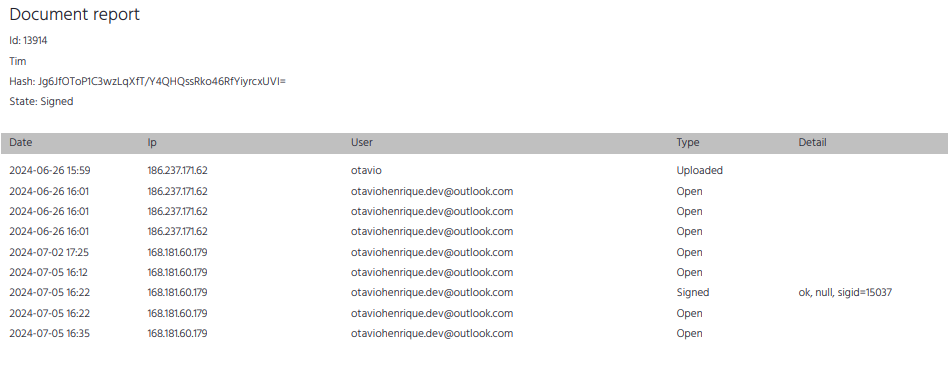
Parameters
To perform the request, the following parameter is mandatory:
- docToken – String – This is the unique identification token of the document for which you want to download the report. You receive this token when you upload the document to the server.Required
How to implement
import java.io.IOException;
import java.net.URI;
import java.net.http.HttpClient;
import java.net.http.HttpRequest;
import java.net.http.HttpResponse;

public class DownloadDocReport {

    public static void main(String[] args) throws IOException, InterruptedException {
        String docToken = "e1e5efc1-6874-44ee-af24-e74493916f2b_1719417589096";
        String token_auth = "••••••";

        downloadDocReport(docToken, token);
    }

    // Function to download document report by token
    private static void downloadDocReport(String docToken, String token) throws IOException, InterruptedException {
        HttpClient client = HttpClient.newHttpClient();

        String url = "https://test.signosoft.com/api/REST/downloadDocReport?docToken=" + docToken;

        HttpRequest request = HttpRequest.newBuilder()
                .uri(URI.create(url))
                .header("accept", "application/json;charset=UTF-8")
                .header("Authorization", "Bearer " + token_auth)
                .POST(HttpRequest.BodyPublishers.noBody())
                .build();

        HttpResponse<String> response = client.send(request, HttpResponse.BodyHandlers.ofString());

        // Print response
        System.out.println(response.body());
    }
}
import requests

def download_doc_report():
    url = 'https://signosoft.com/api/REST/downloadDocReport'
    doc_token = 'e1e5efc1-6874-44ee-af24-e74493916f2b_1719417589096'
    token_auth = '••••••'

    headers = {
        'accept': 'application/json;charset=UTF-8',
        'Authorization': 'Bearer ' + token_auth
    }

    response = requests.post(url + '?docToken=' + doc_token, headers=headers)
    print(response.text)

download_doc_report()
  <?php
function downloadDocReport() {
  $url = 'https://test.signosoft.com/api/REST/downloadDocReport?docToken=e1e5efc1-6874-44ee-af24-e74493916f2b_1719417589096';
  $token_auth = '••••••';

  $headers = array(
      'accept: application/json;charset=UTF-8',
      'Authorization: Bearer ' . $token_auth
  );

  $options = array(
      'http' => array(
          'header' => implode("\r\n", $headers),
          'method' => 'POST',
          'content' => ''  // No body content
      )
  );

  $context = stream_context_create($options);
  $result = file_get_contents($url, false, $context);

  if ($result === FALSE) {
      echo "Error";
  } else {
      echo $result;
  }
}

downloadDocReport();
  ?>
package main

import (
    "fmt"
    "net/http"
    "strings"
)

func main() {
    downloadDocReport()
}

func downloadDocReport() {
    url := "https://test.signosoft.com/api/REST/downloadDocReport?docToken=e1e5efc1-6874-44ee-af24-e74493916f2b_1719417589096"
    token_auth := "••••••"

    req, err := http.NewRequest("POST", url, strings.NewReader(""))
    if err != nil {
        fmt.Println("Error creating request:", err)
        return
    }

    req.Header.Set("accept", "application/json;charset=UTF-8")
    req.Header.Set("Authorization", "Bearer "+token_auth)

    client := &http.Client{}
    resp, err := client.Do(req)
    if err != nil {
        fmt.Println("Error sending request:", err)
        return
    }
    defer resp.Body.Close()

    fmt.Println("Response Status:", resp.Status)

    // Print response body
    buf := make([]byte, 1024)
    for {
        n, err := resp.Body.Read(buf)
        if n == 0 || err != nil {
            break
        }
        fmt.Print(string(buf[:n]))
    }
}
Returns
{
  "result": "OK",
  "data": "JVBERi0xLjQKJfbk/N8KMSAwIG9iago8PAovVHlwZSAvQ2F0YWxvZw...""
}
Uploading attachments
Description
It is often necessary to add attachments or other documents to a created document. This route is
exclusive for uploading attachments, for existing documents. To upload it along with the document,
at the time of
creation, you can use the attachments parameter of uploadDocument. Look here.
REST/uploadAttachment route, you can achieve this goal. The process is
quite simple:1) Upload the document to get the document token.
2) Call the
REST/uploadAttachment route, specifying the document or contract token
(more details
in the next section), along with the documents you want to attach, converted to base64.
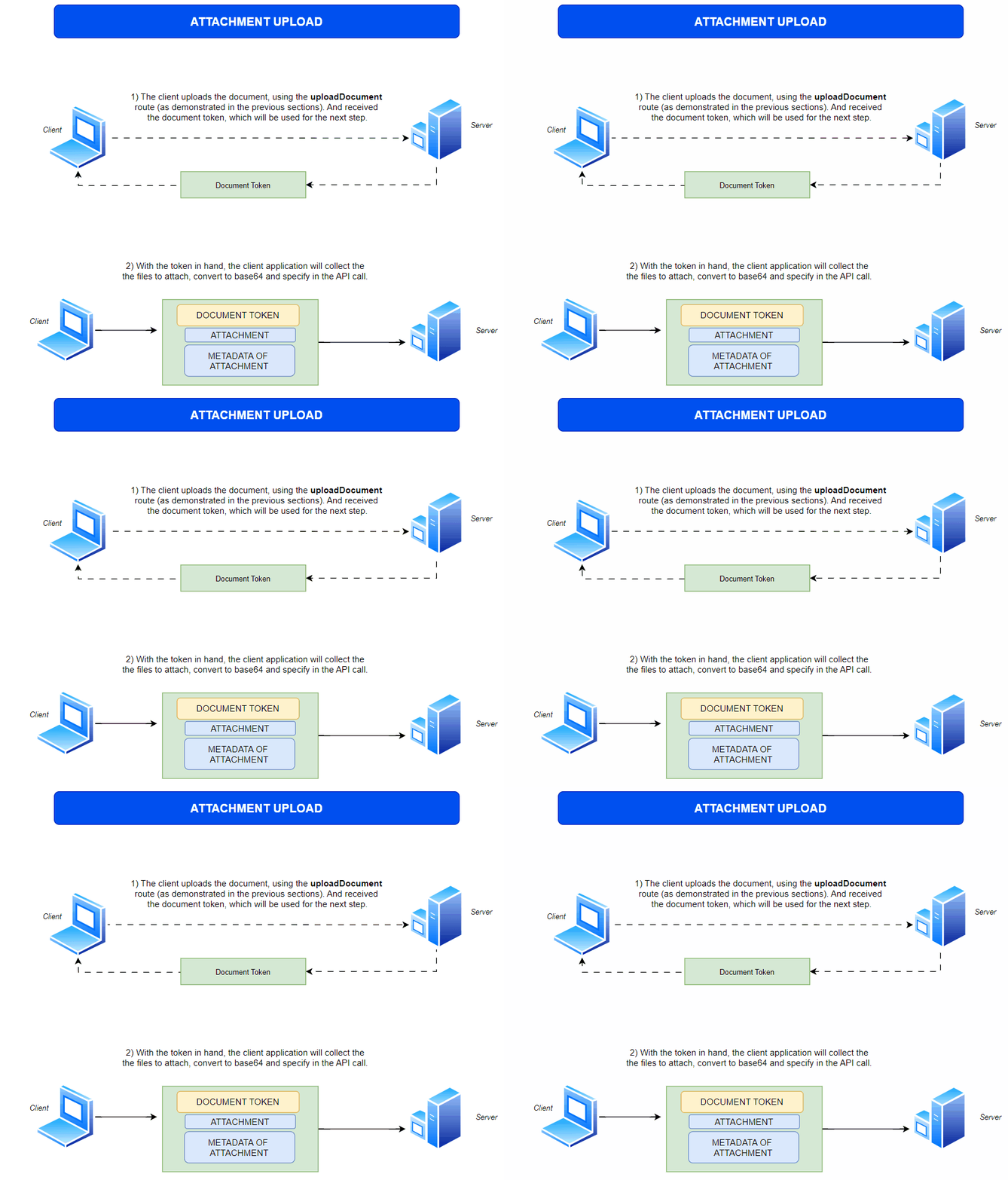
Attachments will be added to the document according to the specified token. Various types of
attachments are supported, such
as PNG, JPEG, PDF, GIF, among others. In the body of the request, the attachment metadata must
also be specified, which is nothing
more than information about the attachment.
Metadata:
{"name":"NAME_OF_YOUR_ATTACHMENT","type":"EXTENSION_OF_YOUR_ATTACHMENT"}
Example:
{"name":"document_seller","type":"jpg"}
UPLOAD OF BUYER’S DOCUMENT
"token": "PROPERTY_DOCUMENT_TOKEN",
"data": ["PHOTO_OF_BUYER'S_DOCUMENT_IN_BASE64"],
"metadata":{"name" : "document_buyer", "type": "jpg"}
UPLOAD OF SELLER’S DOCUMENT
"token": "PROPERTY_DOCUMENT_TOKEN",
"data": ["PHOTO_OF_SELLER_DOCUMENT_IN_BASE64"],
"metadata":{"name" : "document_seller", "type": "jpg"}
Parameters
To perform the request, the following parameter is mandatory:
-
token – String – The token of the document or contract. This token is
returned by the
uploadDocumentorcreateContractmethod. Required - id – Integer – The ID of an existing attachment that will be changed. Optional
- data – JSON – An array of objects holding the attachment data as a BASE64 encoded attachment file. If empty, the data can be uploaded manually later in the GUI. Optional
-
metadata – JSON – An array of objects holding the attachment metadata
structure. If empty, the data can be uploaded manually later in the GUI.
Optional
- name – String – The name of the attachment.
- type – String – The type of the attachment.
- description – String – A description of the attachment.
- required – Boolean – Specifies if the attachment is required. If set to true, Signosoft will not allow the document to be finalized without the attachment data.
- name – String – The name of the attachment. Optional
- type – String – The type of the attachment. Optional
- description – String – A description of the attachment. Optional
- required – Boolean – Specifies if the attachment is required. If set to true, Signosoft will not allow the document to be finalized without the attachment data. Optional
- any other fields – Any other fields will be passed to the finalization process by Signosoft. Optional
How to implement
import java.io.IOException;
import java.net.URI;
import java.net.http.HttpClient;
import java.net.http.HttpRequest;
import java.net.http.HttpResponse;
import java.net.http.HttpRequest.BodyPublishers;

public class UploadAttachment {

  public static void main(String[] args) throws IOException, InterruptedException {
      String token = "TOKEN_YOUR_DOCUMENT";
      String data = "data:image/png;base64,iVBORw0KGgoAAAANSUhEUgAADwAAAAhwBAMAAABikNZBAAAALVBMVEVHcEy8k...";
      String metadata = "{\"name\":\"DOC-01\",\"type\":\"jpg\"}, {\"name\":\"DOC-02\",\"type\":\"jpg\"}";
      String authToken = "token_auth";

      uploadAttachment(token, data, metadata, authToken);
  }

  // Function to upload attachment
  private static void uploadAttachment(String token, String data, String metadata, String authToken) throws IOException, InterruptedException {
      HttpClient client = HttpClient.newHttpClient();

      String url = "https://signosoft.com/api/REST/uploadAttachment";
      String body = "token=" + token + "&data=" + data + "&metadata=" + metadata;

      HttpRequest request = HttpRequest.newBuilder()
              .uri(URI.create(url))
              .header("Content-Type", "application/x-www-form-urlencoded")
              .header("Authorization", "Bearer " + authToken)
              .POST(BodyPublishers.ofString(body))
              .build();

      HttpResponse<String> response = client.send(request, HttpResponse.BodyHandlers.ofString());

      // Print response
      System.out.println(response.body());
  }
}
}
import requests

def upload_attachment():
  url = 'https://signosoft.com/api/REST/uploadAttachment'
  token = 'TOKEN_YOUR_DOCUMENT'
  data = 'data:image/png;base64,iVBORw0KGgoAAAANSUhEUgAADwAAAAhwB...'
  metadata = '{"name":"DOC-01","type":"jpg"}, {"name":"DOC-02","type":"jpg"}'
  auth_token = '••••••'

  headers = {
      'Content-Type': 'application/x-www-form-urlencoded',
      'Authorization': 'Bearer ' + auth_token
  }

  payload = {
      'token': token,
      'data': data,
      'metadata': metadata
  }

  response = requests.post(url, headers=headers, data=payload)
  print(response.text)

upload_attachment()
<?php
 $token,
        'data' => $data,
        'metadata' => $metadata
    ));

    $options = array(
        'http' => array(
            'header' => implode("\r\n", $headers),
            'method' => 'POST',
            'content' => $postData
        )
    );

    $context = stream_context_create($options);
    $result = file_get_contents($url, false, $context);

    if ($result === FALSE) {
        echo "Error";
    } else {
        echo $result;
    }
}

uploadAttachment();
?>
  package main

  import (
      "fmt"
      "net/http"
      "strings"
  )

  func main() {
      uploadAttachment()
  }

  func uploadAttachment() {
      url := "https://signosoft.com/api/REST/uploadAttachment"
      token := "TOKEN_YOUR_DOCUMENT"
      data := "data:image/png;base64,iVBORw0KGgoAAAANSUhEUgAADwAAAAhwBAMAAABikNZBAAAALVBMVEVHcEy8kzH0nCYnmkf8wBEnmkcbc+jkOi3eNCj/..."
      metadata := "{\"name\":\"DOC-01\",\"type\":\"jpg\"}, {\"name\":\"DOC-02\",\"type\":\"jpg\"}"
      token_auth := "••••••"

      payload := strings.NewReader("token=" + token + "&data=" + data + "&metadata=" + metadata)

      req, _ := http.NewRequest("POST", url, payload)
      req.Header.Add("Content-Type", "application/x-www-form-urlencoded")
      req.Header.Add("Authorization", "Bearer " + token_auth)

      res, _ := http.DefaultClient.Do(req)

      defer res.Body.Close()
      fmt.Println("response Status:", res.Status)
        }
Returns
If the request is successful, it will return the attachment id.
{"uploadResult":"OK","id":442}
How to edit information from an existing attachment?
To edit information about existing attachments, it's simple: use the id parameter with the attachment ID, along with the document token, and fill in the new desired information.
import java.io.IOException;
import java.net.URI;
import java.net.http.HttpClient;
import java.net.http.HttpRequest;
import java.net.http.HttpResponse;
import java.net.http.HttpRequest.BodyPublishers;

public class ChangeAttachment {

  public static void main(String[] args) throws IOException, InterruptedException {
      String token = "TOKEN_YOUR_DOCUMENT";
      String metadata = "{\"name\":\"DOC-01\",\"type\":\"jpg\"}, {\"name\":\"DOC-02\",\"type\":\"jpg\"}";
      String authToken = "token_auth";
      Int id = 442;

      uploadAttachment(token, metadata, authToken, id);
  }

  // Function to upload attachment
  private static void uploadAttachment(String token, String data, String metadata, String authToken) throws IOException, InterruptedException {
      HttpClient client = HttpClient.newHttpClient();

      String url = "https://signosoft.com/api/REST/uploadAttachment";
      String body = "token=" + token + "&metadata=" + metadata + "&id=" + id;

      HttpRequest request = HttpRequest.newBuilder()
              .uri(URI.create(url))
              .header("Content-Type", "application/x-www-form-urlencoded")
              .header("Authorization", "Bearer " + authToken)
              .POST(BodyPublishers.ofString(body))
              .build();

      HttpResponse<String> response = client.send(request, HttpResponse.BodyHandlers.ofString());

      // Print response
      System.out.println(response.body());
  }
}
}
import requests

def change_attachment():
  url = 'https://signosoft.com/api/REST/uploadAttachment'
  token = 'TOKEN_YOUR_DOCUMENT'
  metadata = '{"name":"DOC-01","type":"jpg"}, {"name":"DOC-02","type":"jpg"}'
  auth_token = '••••••'
  id = 442

  headers = {
      'Content-Type': 'application/x-www-form-urlencoded',
      'Authorization': 'Bearer ' + auth_token
  }

  payload = {
      'token': token,
      'data': data,
      'metadata': metadata
      'id': id
  }

  response = requests.post(url, headers=headers, data=payload)
  print(response.text)

change_attachment()
<?php

function changeAttachment() {
    $url = 'https://signosoft.com/api/REST/uploadAttachment';
    $token = 'TOKEN_YOUR_DOCUMENT';
    $metadata = '{"name":"DOC-01","type":"jpg"}, {"name":"DOC-02","type":"jpg"}';
    $auth_token = '••••••';
    $id = 442

    $headers = array(
        'Content-Type: application/x-www-form-urlencoded',
        'Authorization: Bearer ' . $auth_token
    );

    $postData = http_build_query(array(
        'token' => $token,
        'data' => $data,
        'metadata' => $metadata
        'id' => $id
    ));

    $options = array(
        'http' => array(
            'header' => implode("\r\n", $headers),
            'method' => 'POST',
            'content' => $postData
        )
    );

    $context = stream_context_create($options);
    $result = file_get_contents($url, false, $context);

    if ($result === FALSE) {
        echo "Error";
    } else {
        echo $result;
    }
}

changeAttachment();
?>
  package main

  import (
      "fmt"
      "net/http"
      "strings"
  )

  func main() {
      ChangeAttachment()
  }

  func ChangeAttachment() {
      url := "https://signosoft.com/api/REST/uploadAttachment"
      token := "TOKEN_YOUR_DOCUMENT"
      metadata := "{\"name\":\"DOC-01\",\"type\":\"jpg\"}, {\"name\":\"DOC-02\",\"type\":\"jpg\"}"
      token_auth := "••••••"
      id := 442

      payload := strings.NewReader("token=" + token + "&data=" + data + "&metadata=" + metadata + "&id=" + id)

      req, _ := http.NewRequest("POST", url, payload)
      req.Header.Add("Content-Type", "application/x-www-form-urlencoded")
      req.Header.Add("Authorization", "Bearer " + token_auth)

      res, _ := http.DefaultClient.Do(req)

      defer res.Body.Close()
      fmt.Println("response Status:", res.Status)
        }
Upload Attachments
Next sections!
We have reached the end of this section of documents, with the knowledge acquired so far, your application will be able to do: Uploads, Downloads, include attachments, validate and much more.
Imagine that your application needs to group several documents into a type of contract. How can we achieve this result?
In the following section, you will explore contract routes.
Contracts
Contracts serve to group several documents into a kind of "envelope", where each individual
document remains unique within the contract.

Creating contracts
Description
To upload contracts, simply call the REST/CreateContract route. Creating contracts is similar to creating a document.
The documents that will make up the contract must be specified in the documents property. If each document is created from an existing template,
simply specify it in the templates property in an orderly manner. The other attributes have already been specified in the document creation section.
The following figure illustrates how this route works.
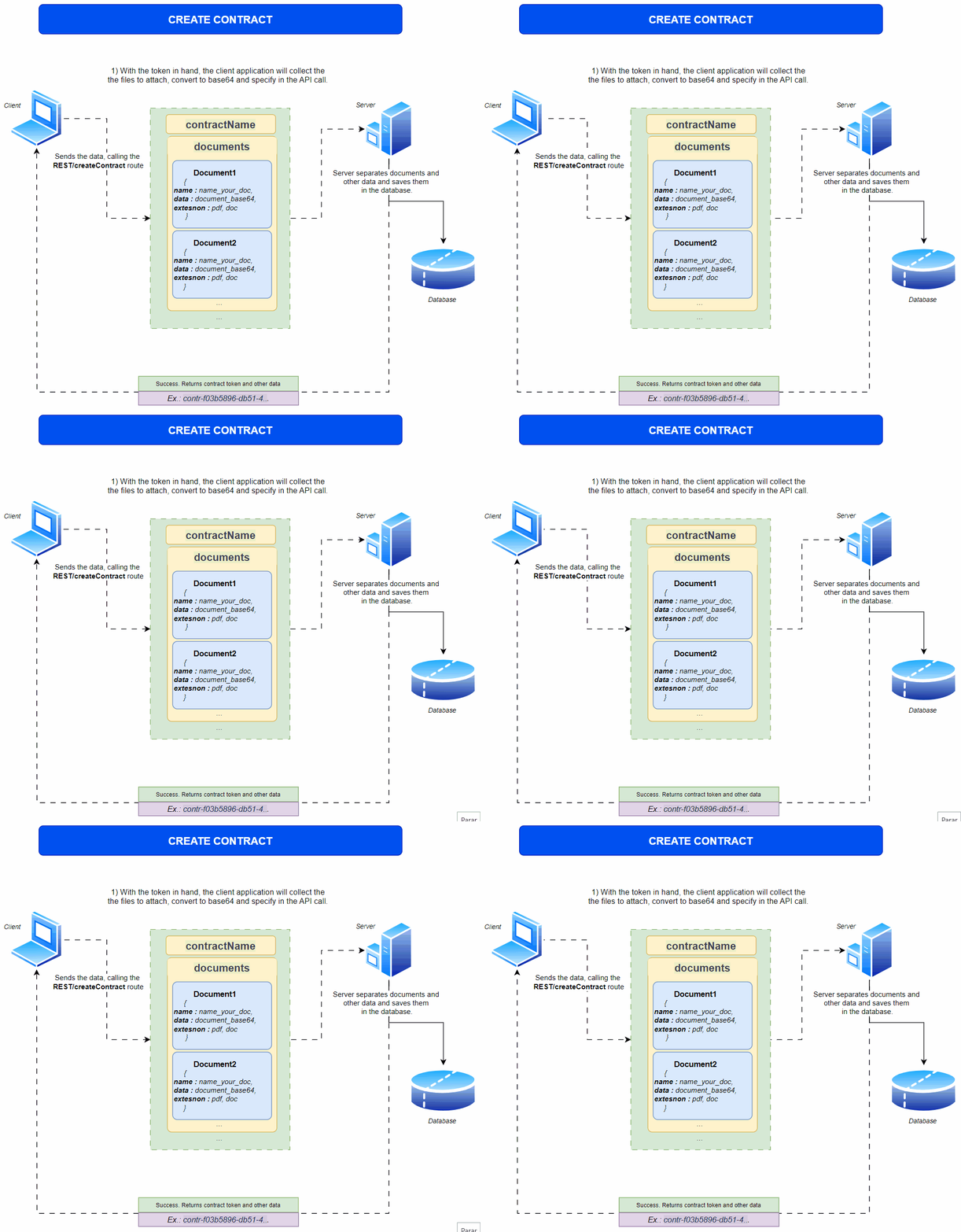
Imagine that in a certain hospital, a patient, to undergo a certain simple surgery, needs three documents, which are:
Informed Consent Form: This document guarantees that the patient was informed about the details of the surgery, including the risks, benefits, alternatives and possible complications.
Authorization for Anesthesia: This document is specific to the administration of anesthesia during surgery.
Authorization to Perform Additional Procedures if Necessary: During surgery, unexpected situations may arise that require additional procedures not initially planned.
These documents must be signed within hours of admission.
- contractName - Terms of hospitalization
- documents
- Informed Consent Form
- Authorization for Anesthesia
- Authorization to Perform Additional
- deadline - The current date, but hours after document creation (In Unix format).
See what each property would look like separately:
"contractName" : "Terms of hospitalization" //Name that the contract will receive,
  "owner" : "administrative@hospital.com" //Email to whom the contract will be linked.
[{"name" : "Informed Consent Form", "data" : "data:application/pdf;base64,JVBERi0xLjcN
CiW1tbW1DQoxIDAgb2JqDQo8PC9UeXBlL0NhdGFsb2cvUGFnZXMgMiAwIFIvTGFuZyhwd...", "extension" : "pdf"}]
//First document, converted to base64
[{"name" : "Authorization for Anesthesia", "data" : "data:application/pdf;base64,JVBERisd0xLjcN
gdflgkdkçfjjhsdgjhfsdlsdfdçdUGFnZXMgMiAwIFIvTGFuZyhwd...", "extension" : "pdf"}]
//Second document, converted to base64
[{"name" : "Authorization to Perform Additional", "data" : "data:application/pdf;base64,gffhfghBERisd0xLjcN
gdflgdgertgergGFuZyhwd...", "extension" : "pdf"}]
//Third document, converted to base64
"deadline" : 1721276718 //Date and time converted to UNIX formatLet's combine the documents into a single object.
"documents" : [{"name" : "Informed Consent Form", "data" : "data:application/pdf;base64,JVBERi0xLjcN
CiW1tbW1DQoxIDAgb2JqDQo8PC9UeXBlL0NhdGFsb2cvUGFnZXMgMiAwIFIvTGFuZyhwd...", "extension" : "pdf"},
{"name" : "Authorization for Anesthesia", "data" : "data:application/pdf;base64,JVBERisd0xLjcN
gdflgkdkçfjjhsdgjhfsdlsdfdçdUGFnZXMgMiAwIFIvTGFuZyhwd...", "extension" : "pdf"},
{"name" : "Authorization to Perform Additional", "data" : "data:application/pdf;base64,gffhfghBERisd0xLjcN
gdflgdgertgergGFuZyhwd...", "extension" : "pdf"}]
After sending the request, the contract token and the token of the three created documents are returned. The
tokens can be stored in your application for future reference (which we will see in the next section).
{
  "result": "OK",
  "conname": "Terms of hospitalization",
  "conid": 448,
  "token": "contr-f03b5896-db51-4f54-b410-e7b36472b593_1598366392547",
  "condeadline":1721276718,
  "documents":[
    {
      "docid":1235,
      "doctoken":"3506eb2f-dedd-4b1b-a878-dd1c8b81e0d9_1611568933444",
    },
    {
      "docid":1236,
      "doctoken":"2795576c-71f6-4bd7-a8af-a942889e0d1b_1661504069939",
    },
    {
      "docid":1237,
      "doctoken":"2795576c-71f6-4bd7-a8af-a942889e0d1b_1661504069937",
    }
  ]
}
[{"name" : "Informed Consent Form", "data" : "data:application/pdf;base64,JVBERi0xLjcN
CiW1tbW1DQoxIDAgb2JqDQo8PC9UeXBlL0NhdGFsb2cvUGFnZXMgMiAwIFIvTGFuZyhwd...", "extension" : "pdf",
"parameters" : "type=signature|signerlogin=daviesmh@example.com|signerfirstname=Davies|signersecondname=Rock|
page=2|positionY=80|positionX=20|required=true"}]
//With parameters
Parameters
- owner – String – Login (email) of the contract owner, that is, to which account this contract will belong. Required
- contractName – String – Name that the contract will receive. Required
-
documents – JSON – An array of objects holding the attachment data as a BASE64 encoded attachment file. If empty, the data can be uploaded manually later in the GUI.
Optional
- data – String – Base-64 encoded PDF document.
- name – String – Name of the document to be displayed in the document list.
- parameters – String – Additional parameters for the document to be uploaded with.
- commands – String – JSON object to drive document workflow. Used for Finalize plugin.
- extension – String – If the document is in a format other than PDF, the Signosoft server, if configured, can provide conversion.
-
templates – JSON – An array of objects holding the template data.
Optional
- token – String – Template identification.
- name – String – Name of the document when created from the template.
- parameters – String – Additional parameters for filling the template with data.
- applicationMode – String – Specifies if the acroform fields in the contract can be modified by the user. Allowed values are ‘SIGN’ or ‘EDIT’. If not sent, the default value “EDIT“ is used. EDIT mode allows the user to change contract fields before sending the contract to be signed. For example, the size and position of the acroform fields can be changed in the Signosoft GUI. SIGN mode disables the possibility to change the contract. It only allows you to fill in the existing fields and sign the document. Optional
- deadline – Long – Time of contract expiry in epoch (unix) format. Optional
- attachments – JSON – JSON array of metadata of the attachments required to be filled by the signer during the signing process. Metadata description is in the attachments section. Optional
How to implement
import java.io.IOException;
import java.net.URI;
import java.net.http.HttpClient;
import java.net.http.HttpRequest;
import java.net.http.HttpResponse;
import java.nio.charset.StandardCharsets;
import java.util.HashMap;
import java.util.Map;
import java.net.URLEncoder;
import java.net.http.HttpRequest.BodyPublishers;

public class CreateContract {

  public static void main(String[] args) throws IOException, InterruptedException {
      String contractName = "Terms of hospitalization";
      String documents = "[{\"name\" : \"Informed Consent Form\", \"data\" : \"data:application/pdf;base64,JVBERi0xLjQKJfbk/N8KMSAwIG9iago8PAovTmFtZXMgMiAwIFIKL1R5cGUgL0NhdGFsb2cKL1BhZ2VzIDMgMCBSCj4+CmVuZG9iago0IDAgb2JqCjw8Ci9DcmVhdG9yIDwwOTQ4QzI0MjlERDNBQjQwRUExOTZCMjAxMTJBNTg1RTJFQTE4RTUxOTkzNkNEMjMzQTgwMjZFQTUxRDczN0U4M0M4RjcyQUUwNDMxNEFCQ0FCNjAyOENGQzg3RjRCQ0M+Ci9Qcm9kdWN...\", \"extension\" : \"pdf\", \"parameters\" : \"type=signature|signerlogin=daviesmh@example.com|signerfirstname=Davies|signersecondname=Rock|page=2|positionY=80|positionX=20|required=true\"}]";
      String deadline = "1722110655";
      String owner = "administrative@hospital.com";

      createContract(contractName, documents, deadline, owner);
  }

  // Function to create contract
  private static void createContract(String contractName, String documents, String deadline, String owner) throws IOException, InterruptedException {
      HttpClient client = HttpClient.newHttpClient();
      Map<String, String> params = new HashMap<>();
      params.put("contractName", contractName);
      params.put("documents", documents);
      params.put("deadline", deadline);
      params.put("owner", owner);

      String requestBody = buildFormDataFromMap(params);

      HttpRequest request = HttpRequest.newBuilder()
              .uri(URI.create("https://test.signosoft.com/api/REST/createContract"))
              .header("Content-Type", "application/x-www-form-urlencoded")
              .header("Authorization", "Bearer ••••••")
              .POST(BodyPublishers.ofString(requestBody))
              .build();

      HttpResponse<String> response = client.send(request, HttpResponse.BodyHandlers.ofString());

      // Print response
      System.out.println(response.body());
  }

  // Helper function to build form data from map
  private static String buildFormDataFromMap(Map<String, String> data) throws IOException {
      StringBuilder builder = new StringBuilder();
      for (Map.Entry<String, String> entry : data.entrySet()) {
          if (builder.length() > 0) {
              builder.append("&");
          }
          builder.append(URLEncoder.encode(entry.getKey(), StandardCharsets.UTF_8));
          builder.append("=");
          builder.append(URLEncoder.encode(entry.getValue(), StandardCharsets.UTF_8));
      }
      return builder.toString();
  }
}
import requests

def create_contract():
    url = 'https://test.signosoft.com/api/REST/createContract'
    headers = {
        'Content-Type': 'application/x-www-form-urlencoded',
        'Authorization': 'Bearer ••••••'
    }

    payload = {
        'contractName': 'Terms of hospitalization',
        'documents': '[{"name" : "Informed Consent Form", "data" : "data:application/pdf;base64,JVBERi0xLjQKJfbk/N8KMSAwIG9iago8PAovTmFtZXMgMiAwIFIKL1R5cGUgL0NhdGFsb2cKL1BhZ2VzIDMgMCBSCj4+CmVuZG9iago0IDAgb2JqCjw8Ci9DcmVhdG9yIDwwOTQ4QzI0MjlERDNBQjQwRUExOTZCMjAxMTJBNTg1RTJFQTE4RTUxOTkzNkNEMjMzQTgwMjZFQTUxRDczN0U4M0M4RjcyQUUwNDMxNEFCQ0FCNjAyOENGQzg3RjRCQ0M+Ci9Qcm9kdWN...", "extension" : "pdf", "parameters" : "type=signature|signerlogin=daviesmh@example.com|signerfirstname=Davies|signersecondname=Rock|page=2|positionY=80|positionX=20|required=true"}]',
        'deadline': '1722110655',
        'owner': 'administrative@hospital.com'
    }

    response = requests.post(url, headers=headers, data=payload)
    print(response.text)

create_contract()
  <?php

  function createContract() {
      $url = 'https://test.signosoft.com/api/REST/createContract';
      $headers = array(
          'Content-Type: application/x-www-form-urlencoded',
          'Authorization: Bearer ••••••'
      );

      $postData = http_build_query(array(
          'contractName' => 'Terms of hospitalization',
          'documents' => '[{"name" : "Informed Consent Form", "data" : "data:application/pdf;base64,JVBERi0xLjQKJfbk/N8KMSAwIG9iago8PAovTmFtZXMgMiAwIFIKL1R5cGUgL0NhdGFsb2cKL1BhZ2VzIDMgMCBSCj4+CmVuZG9iago0IDAgb2JqCjw8Ci9DcmVhdG9yIDwwOTQ4QzI0MjlERDNBQjQwRUExOTZCMjAxMTJBNTg1RTJFQTE4RTUxOTkzNkNEMjMzQTgwMjZFQTUxRDczN0U4M0M4RjcyQUUwNDMxNEFCQ0FCNjAyOENGQzg3RjRCQ0M+Ci9Qcm9kdWN...", "extension" : "pdf", "parameters" : "type=signature|signerlogin=daviesmh@example.com|signerfirstname=Davies|signersecondname=Rock|page=2|positionY=80|positionX=20|required=true"}]',
          'deadline' => '1722110655',
          'owner' => 'administrative@hospital.com'
      ));

      $ch = curl_init($url);
      curl_setopt($ch, CURLOPT_HTTPHEADER, $headers);
      curl_setopt($ch, CURLOPT_RETURNTRANSFER, true);
      curl_setopt($ch, CURLOPT_POSTFIELDS, $postData);

      $response = curl_exec($ch);
      curl_close($ch);

      echo $response;
  }

  createContract();

?>
package main

import (
    "fmt"
    "net/http"
    "net/url"
    "strings"
    "io/ioutil"
)

func main() {
    createContract()
}

func createContract() {
    client := &http.Client{}
    data := url.Values{}
    data.Set("contractName", "Terms of hospitalization")
    data.Set("documents", "[{\"name\" : \"Informed Consent Form\", \"data\" : \"data:application/pdf;base64,JVBERi0xLjQKJfbk/N8KMSAwIG9iago8PAovTmFtZXMgMiAwIFIKL1R5cGUgL0NhdGFsb2cKL1BhZ2VzIDMgMCBSCj4+CmVuZG9iago0IDAgb2JqCjw8Ci9DcmVhdG9yIDwwOTQ4QzI0MjlERDNBQjQwRUExOTZCMjAxMTJBNTg1RTJFQTE4RTUxOTkzNkNEMjMzQTgwMjZFQTUxRDczN0U4M0M4RjcyQUUwNDMxNEFCQ0FCNjAyOENGQzg3RjRCQ0M+Ci9Qcm9kdWN...\", \"extension\" : \"pdf\", \"parameters\" : \"type=signature|signerlogin=daviesmh@example.com|signerfirstname=Davies|signersecondname=Rock|page=2|positionY=80|positionX=20|required=true\"}]")
    data.Set("deadline", "1722110655")
    data.Set("owner", "administrative@hospital.com")

    req, _ := http.NewRequest("POST", "https://test.signosoft.com/api/REST/createContract", strings.NewReader(data.Encode()))
    req.Header.Add("Content-Type", "application/x-www-form-urlencoded")
    req.Header.Add("Authorization", "Bearer ••••••")

    res, _ := client.Do(req)
    defer res.Body.Close()
    body, _ := ioutil.ReadAll(res.Body)

    fmt.Println(string(body))
}
Returns
{
  "result": "OK",
  "documents": [
      {
          "docid": 14620,
          "doctoken": "8ec79ba0-1dba-4fff-8dc6-567606959e6c_1722013679110"
      }
  ],
  "conname": "Terms of hospitalization",
  "conid": 1406,
  "token": "contr-f91b1a57-0df2-418c-948c-a50789a9a5c2_1722013678574",
  "condeadline": 1722111000
}
- documents – Object – Documents linked in the contract.
- conname – String – Contract name.
- conid – Long – Contract ID.
- token – String – Contract token.
- condeadline – Long – Expiration of contract signatures.
Downloading contracts
Description
Similar to downloading documents, you can download contracts by specifying the contract token.
By default, all contract tokens start with the prefix "contr-".For this you will use the route REST/downloadContract
When specifying the contract token, you must provide two additional properties: toFile and base64array.
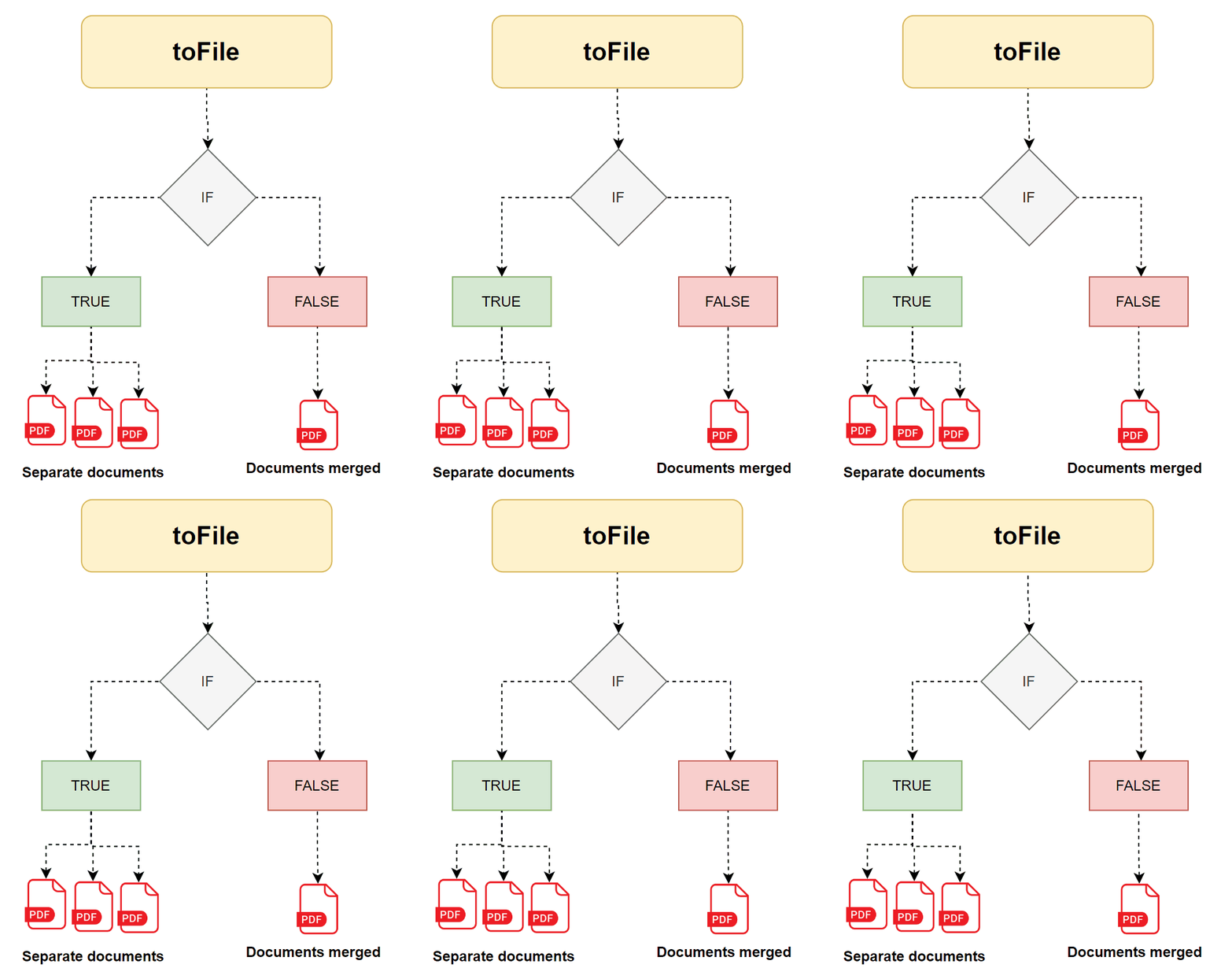
encoded in base64. If false, the documents will be merged into a single file.
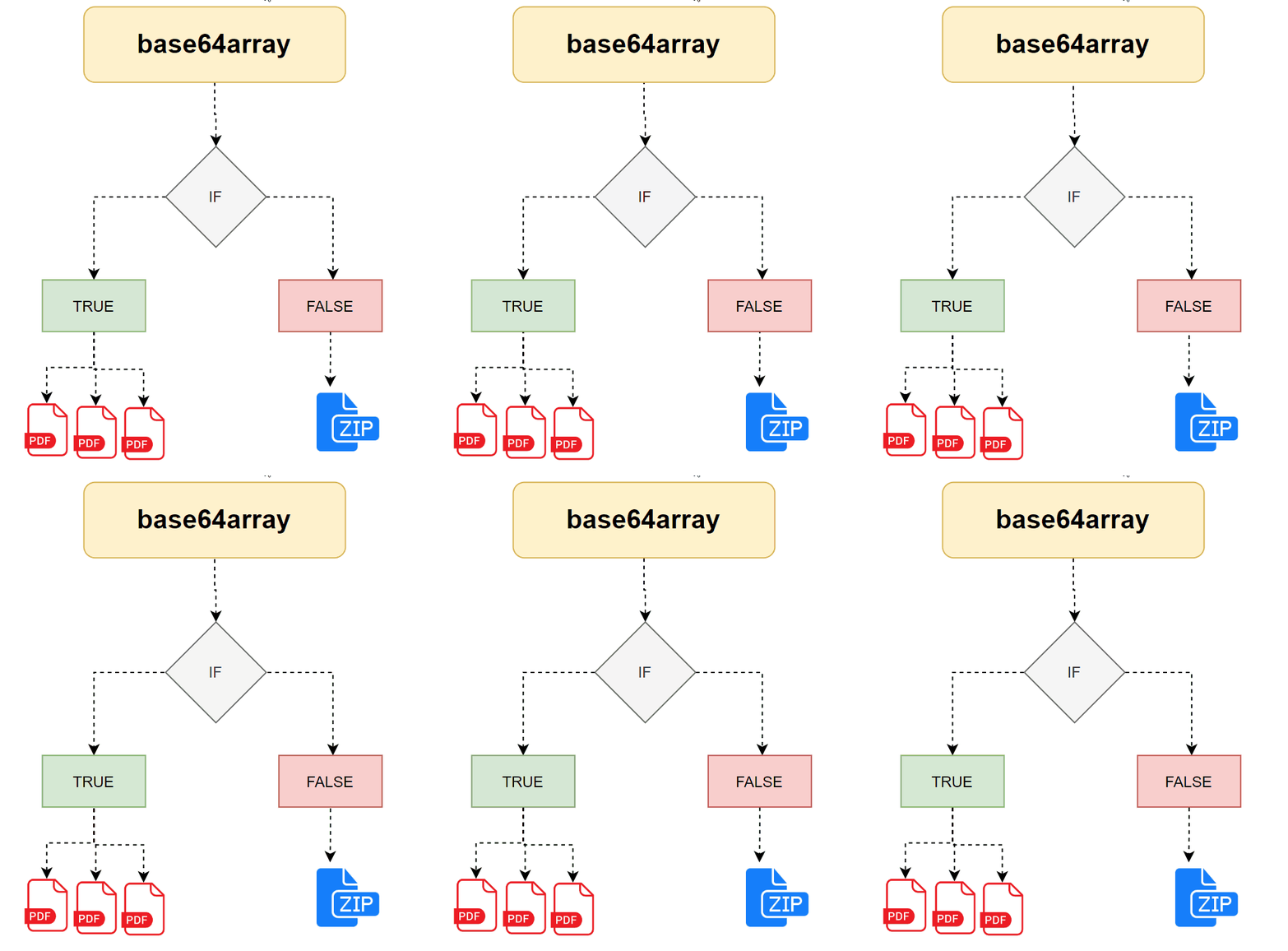
Parameters
- docToken – String – Token of the contract to download. Required
- toFile – Boolean – Indicates if the method will return separate files if true, or one merged PDF file if false. Optional
- base64array – Boolean – True indicates if the API returns an array of base64-encoded documents with metadata; false returns a base64-encoded ZIP file containing all documents in the contract. Optional
How to implement
import java.io.IOException;
import java.net.URI;
import java.net.http.HttpClient;
import java.net.http.HttpRequest;
import java.net.http.HttpResponse;
import java.nio.charset.StandardCharsets;
import java.util.HashMap;
import java.util.Map;
import java.net.URLEncoder;
import java.net.http.HttpRequest.BodyPublishers;

public class DownloadContract {

    public static void main(String[] args) throws IOException, InterruptedException {
        String docToken = "contr-5b48f81d-7b8a-481e-ba87-637dec07ee67_1722017665878";
        String toFile = "true";
        String base64array = "true";

        downloadContract(docToken, toFile, base64array);
    }

    // Function to download contract
    private static void downloadContract(String docToken, String toFile, String base64array) throws IOException, InterruptedException {
        HttpClient client = HttpClient.newHttpClient();
        Map<String, String> params = new HashMap<>();
        params.put("docToken", docToken);
        params.put("toFile", toFile);
        params.put("base64array", base64array);

        String requestBody = buildFormDataFromMap(params);

        HttpRequest request = HttpRequest.newBuilder()
                .uri(URI.create("https://test.signosoft.com/api/REST/downloadContract"))
                .header("Content-Type", "application/x-www-form-urlencoded")
                .header("Authorization", "Bearer ••••••")
                .POST(BodyPublishers.ofString(requestBody))
                .build();

        HttpResponse<String> response = client.send(request, HttpResponse.BodyHandlers.ofString());

        // Print response
        System.out.println(response.body());
    }

    // Helper function to build form data from map
    private static String buildFormDataFromMap(Map<String, String> data) throws IOException {
        StringBuilder builder = new StringBuilder();
        for (Map.Entry<String, String> entry : data.entrySet()) {
            if (builder.length() > 0) {
                builder.append("&");
            }
            builder.append(URLEncoder.encode(entry.getKey(), StandardCharsets.UTF_8));
            builder.append("=");
            builder.append(URLEncoder.encode(entry.getValue(), StandardCharsets.UTF_8));
        }
        return builder.toString();
    }
}
import requests

def download_contract():
    url = 'https://test.signosoft.com/api/REST/downloadContract'
    headers = {
        'Content-Type': 'application/x-www-form-urlencoded',
        'Authorization': 'Bearer ••••••'
    }

    payload = {
        'docToken': 'contr-5b48f81d-7b8a-481e-ba87-637dec07ee67_1722017665878',
        'toFile': 'true',
        'base64array': 'true'
    }

    response = requests.post(url, headers=headers, data=payload)
    print(response.text)

download_contract()
<?php

function downloadContract() {
    $url = 'https://test.signosoft.com/api/REST/downloadContract';
    $headers = array(
        'Content-Type: application/x-www-form-urlencoded',
        'Authorization: Bearer ••••••'
    );

    $postData = http_build_query(array(
        'docToken' => 'contr-5b48f81d-7b8a-481e-ba87-637dec07ee67_1722017665878',
        'toFile' => 'true',
        'base64array' => 'true'
    ));

    $ch = curl_init($url);
    curl_setopt($ch, CURLOPT_HTTPHEADER, $headers);
    curl_setopt($ch, CURLOPT_RETURNTRANSFER, true);
    curl_setopt($ch, CURLOPT_POSTFIELDS, $postData);

    $response = curl_exec($ch);
    curl_close($ch);

    echo $response;
}

downloadContract();

?>
package main

import (
    "fmt"
    "net/http"
    "net/url"
    "strings"
    "io/ioutil"
)

func main() {
    downloadContract()
}

func downloadContract() {
    client := &http.Client{}
    data := url.Values{}
    data.Set("docToken", "contr-5b48f81d-7b8a-481e-ba87-637dec07ee67_1722017665878")
    data.Set("toFile", "true")
    data.Set("base64array", "true")

    req, _ := http.NewRequest("POST", "https://test.signosoft.com/api/REST/downloadContract", strings.NewReader(data.Encode()))
    req.Header.Add("Content-Type", "application/x-www-form-urlencoded")
    req.Header.Add("Authorization", "Bearer ••••••")

    res, _ := client.Do(req)
    defer res.Body.Close()
    body, _ := ioutil.ReadAll(res.Body)

    fmt.Println(string(body))
}
Returns
{
"flattened": false,
"downloadDocResult": "OK",
"locked": false,
"docData":
"[{\"contoken\":\"contr-5b48f81d-7b8a-481e-ba87-637dec07ee67_172201548487878\",
  \"docid\":14629,\"docdata\":\"JVBERi0xLjcKJfbk/N8KMSAwIG9iago8PAovUGFnZXMgkjkajsdkjhasjkdhaksdhak...\",
  \"conid\":1411,\"docstate\":2,\"docname\":\"Authorization for Anesthesia\",
  \"doctoken\":\"80ffa982-c005-415a-b229-600d469b552a_1722017667026\"},

  {\"contoken\":\"contr-5b48f81d-7b8a-481e-ba87-637dec07ee67_1722017665878\",
  \"docid\":14630,\"docdata\":\"JVBERi0xLjcKJfbk/N8KMSAwIG9iago8PAovUGFnZXMgMiAwIFIKL1R5cGUgL0NhdGFsb2cKL1ZpZXdlclByZWZl...\",
  \"conid\":1411,\"docstate\":2,\"docname\":\"Informed Consent Form\",\"doctoken\":\"75a72b0e-1d48-4077-88b8-202e93bc5fe7_1722017667718\"}]"
}
- downloadDocResult – String – Indicates error when preparing contract for download. Possible values are OK, CONTRACT_TOKEN_ERROR, ERROR.
- docData – String – Value depends on toFile and base64array. If both are true, docData contains a JSON array of objects.
- conid – Integer – Contract ID.
- contoken – String – Contract token.
- docname – String – Name of the document in the contract.
- docid – Integer – Document ID.
- doctoken – String – Document token.
-
docstate – Integer – Document state ID:
- New document - Indicates that the contract or document is new and has not yet been processed or used.
- Ready - Means that the contract or document is prepared and ready to be signed.
- Sign - Indicates that the contract or document has been signed.
- Sent - Means that the contract or document was sent to another party or recipient.
- Deleted - Indicates that the contract or document has been deleted and is no longer available.
- Finalized - Means that the contract or document has been finalized or completed successfully.
- Finalized erro - Indicates that an error occurred during the contract or document finalization process.
- Rejected - Means that the contract or document was rejected by a subscriber or user.
- Expired - Indicates that the validity period of the contract or document has expired.
- doccommands – String – Data from integrator in arbitrary format. Same structure sent in uploadDocument/createContract API.
- docdata – String – Base64 encoded data of the document.
- flattened – Boolean – Specifies if the documents are flattened (without acroform fields and signatures as images). Always false.
Getting by token
Description
Similar to the /REST/getDocumentByToken route mentioned in the previous section, you can use
the /REST/getContractByToken route to get information about a given contract and its respective documents.
Simply provide the contract token in the request to get the necessary information.
Parameters
- token – String – Specify the contract token.
How to implement
import java.io.IOException;
import java.net.URI;
import java.net.http.HttpClient;
import java.net.http.HttpRequest;
import java.net.http.HttpResponse;
import java.nio.charset.StandardCharsets;
import java.net.URLEncoder;
import java.net.http.HttpRequest.BodyPublishers;

public class GetContractByToken {

    public static void main(String[] args) throws IOException, InterruptedException {
        String token = "contr-96bfa6e1-6231-4982-bac7-c9cd0c74f433_1722259103356";

        getContractByToken(token);
    }

    // Function to get contract by token
    private static void getContractByToken(String token) throws IOException, InterruptedException {
        HttpClient client = HttpClient.newHttpClient();
        String requestBody = URLEncoder.encode("token", StandardCharsets.UTF_8) + "=" + URLEncoder.encode(token, StandardCharsets.UTF_8);

        HttpRequest request = HttpRequest.newBuilder()
                .uri(URI.create("https://signosoft.com/api/REST/getContractByToken"))
                .header("Content-Type", "application/x-www-form-urlencoded")
                .header("Authorization", "Bearer ••••••")
                .POST(BodyPublishers.ofString(requestBody))
                .build();

        HttpResponse<String> response = client.send(request, HttpResponse.BodyHandlers.ofString());

        // Print response
        System.out.println(response.body());
    }
}
import requests

def get_contract_by_token():
    url = 'https://signosoft.com/api/REST/getContractByToken'
    headers = {
        'Content-Type': 'application/x-www-form-urlencoded',
        'Authorization': 'Bearer ••••••'
    }

    payload = {
        'token': 'contr-96bfa6e1-6231-4982-bac7-c9cd0c74f433_1722259103356'
    }

    response = requests.post(url, headers=headers, data=payload)
    print(response.text)

get_contract_by_token()
<?php

function getContractByToken() {
    $url = 'https://signosoft.com/api/REST/getContractByToken';
    $headers = array(
        'Content-Type: application/x-www-form-urlencoded',
        'Authorization: Bearer ••••••'
    );

    $postData = http_build_query(array(
        'token' => 'contr-96bfa6e1-6231-4982-bac7-c9cd0c74f433_1722259103356'
    ));

    $ch = curl_init($url);
    curl_setopt($ch, CURLOPT_HTTPHEADER, $headers);
    curl_setopt($ch, CURLOPT_RETURNTRANSFER, true);
    curl_setopt($ch, CURLOPT_POSTFIELDS, $postData);

    $response = curl_exec($ch);
    curl_close($ch);

    echo $response;
}

getContractByToken();

?>
package main

import (
    "fmt"
    "net/http"
    "net/url"
    "strings"
    "io/ioutil"
)

func main() {
    getContractByToken()
}

func getContractByToken() {
    client := &http.Client{}
    data := url.Values{}
    data.Set("token", "contr-96bfa6e1-6231-4982-bac7-c9cd0c74f433_1722259103356")

    req, _ := http.NewRequest("POST", "https://signosoft.com/api/REST/getContractByToken", strings.NewReader(data.Encode()))
    req.Header.Add("Content-Type", "application/x-www-form-urlencoded")
    req.Header.Add("Authorization", "Bearer ••••••")

    res, _ := client.Do(req)
    defer res.Body.Close()
    body, _ := ioutil.ReadAll(res.Body)

    fmt.Println(string(body))
}
Returns
                            {
  "getDocResult": "OK",
  "docObject": {
      "contractDocuments": [
          {
              "name": "Authorization for Anesthesia",
              "id": 14690,
              "contractRange": {
                  "start": 0,
                  "end": 0
              },
              "token": "00f321a0-16c6-4c67-980c-85483e950748_1722259103966"
          },
          {
              "name": "Informed Consent Form",
              "id": 14691,
              "contractRange": {
                  "start": 1,
                  "end": 1
              },
              "token": "f9395ea0-bf97-44d3-b163-5c037f7ad729_1722259104636"
          }
      ],
      "docownerfirstname": "Paul",
      "docid": 1421,
      "docownersecondname": "Hospital",
      "docstateid": 2,
      "docMode": "SIGN",
      "doctoken": "contr-96bfa6e1-6231-4982-bac7-c9cd0c74f433_1722259103356",
      "signatures": [
          {
              "sigsignerfirstname": "Davies",
              "sigrequired": true,
              "signaturePreloadedImage": false,
              "siguser": {
                  "userSecondName": "Rock",
                  "userunregistered": true,
                  "userphone": "",
                  "initials": "",
                  "userFirstName": "Davies",
                  "userid": 1928,
                  "useremail": "daviesmh@example.com"
              },
              "sigid": 15870,
              "sigsigner": "daviesmh@example.com",
              "sigx": 20,
              "siggenerateqr": true,
              "sigmethod": "3",
              "sigorder": -99,
              "sigpage": 2,
              "sigsignersecondname": "Rock",
              "siginperson": false,
              "sigauthmethods": [
                  {
                      "type": "biometric",
                      "order": 0
                  }
              ],
              "sigsigned": false,
              "sigy": 80
          },
          {
              "sigsignerfirstname": "Davies",
              "sigrequired": true,
              "signaturePreloadedImage": false,
              "siguser": {
                  "userSecondName": "Rock",
                  "userunregistered": true,
                  "userphone": "",
                  "initials": "",
                  "userFirstName": "Davies",
                  "userid": 1928,
                  "useremail": "daviesmh@example.com"
              },
              "sigid": 15871,
              "sigsigner": "daviesmh@example.com",
              "sigx": 20,
              "siggenerateqr": true,
              "sigmethod": "3",
              "sigorder": -99,
              "sigpage": 3,
              "sigsignersecondname": "Rock",
              "siginperson": false,
              "sigauthmethods": [
                  {
                      "type": "biometric",
                      "order": 0
                  }
              ],
              "sigsigned": false,
              "sigy": 80
          }
      ],
      "docowner": "administration@hospital.com",
      "docstate": "Ready to sign",
      "docdeleted": false,
      "docname": "Terms of hospitalization",
      "deadline": 0,
      "docdate": 1722259105000
  }
}
- getDocResult – String – Possible values for this field include: OK and CONTRACT_TOKEN_ERROR.
- docObject – String – A JSON object that contains comprehensive contract details, including the specifics of the document and signature information.
- docid – Integer – The unique identifier of the contract.
- docname – String – The name of the contract.
- docowner – String – The email address of the contract owner..
- docownerfirstname – String – The first name of the contract owner..
- docownersecondname – String – The second name (or surname) of the contract owner.
- doctoken – String – A unique token associated with the contract.
-
docstatid, docstate – String – The id and description of the contract state. Possible values include:
- New document/Contract - Indicates that the contract or document is new and has not yet been processed or used.
- Ready - Means that the contract or document is prepared and ready to be signed.
- Signed - Indicates that the contract or document has been signed.
- Sent - Means that the contract or document was sent to another party or recipient.
- Deleted - Indicates that the contract or document has been deleted and is no longer available.
- Finalized - Means that the contract or document has been finalized or completed successfully.
- Finalized erro - Indicates that an error occurred during the contract or document finalization process.
- Rejected - Means that the contract or document was rejected by a subscriber or user.
- Expired - Indicates that the validity period of the contract or document has expired.
- docstatereason – String – The reason for the contract rejection by the signer. This field contains an enumeration value from the configurable REJECT_REASONS_ENUM in the Signosoft administration settings.
- docstatetext – String – If the reason for rejection is "OTHER", this field contains free text provided by the user (e.g., 'Signer refused to sign'). This information is present only if docstateid=8.
- signingsession – String – Information about the signing session, intended for internal use only.
-
contractdocuments – JSON – A JSON array containing detailed information about the documents.
- id – Integer – The unique identifier of the document.
- name – String – The name of the document.
- token – String – A unique token associated with the document.
-
signatures – JSON – A JSON array containing the signatures from all documents within the contract.
- sigid – Integer – The unique identifier of the signature.
- signame – String – The name associated with the signature.
- sigsigner – String – The email address of the signer designated for this field.
- sigsigned – Boolean – Indicates whether this field has been signed.
- sigwidth – Float – The width of the field as a percentage of the page width (See how to measure signature width in the FAQ section)
- sigheight – Float – The height of the field as a percentage of the page height.
- sigx – Float – The X coordinate of the field, expressed as a percentage of the page width(See How to position signatures and elements in the FAQ section).
- sigy – Float – The Y coordinate of the field, expressed as a percentage of the page height.
- sigpage – Integer – The page on which the field is located.
- sigorder – Integer – The order or sequence of the signature process.
- siginperson – Boolean – Indicates whether the field is marked as in-person or remote.
- sigsignerphone – String – The cellphone number of the signer.
- sigsignerfirstname – String – The first name of the signer.
- sigsignersecondname – String – The second name (or surname) of the signer.
Getting by states
Description
This endpoint /REST/getContractStatesByTokens is responsible for returning the states of
contracts related to these tokens.
Parameters
- tokens – String – Especifica o array de tokens.
How to implement
import java.io.IOException;
import java.net.URI;
import java.net.URLEncoder;
import java.net.http.HttpClient;
import java.net.http.HttpRequest;
import java.net.http.HttpResponse;
import java.net.http.HttpRequest.BodyPublishers;
import java.nio.charset.StandardCharsets;

public class GetContractStatesByTokens {

    public static void main(String[] args) throws IOException, InterruptedException {
        String tokensJson = "[\"contr-abc123\", \"contr-def456\"]";
        getContractStatesByTokens(tokensJson);
    }

    private static void getContractStatesByTokens(String tokensJson) throws IOException, InterruptedException {
        HttpClient client = HttpClient.newHttpClient();
        String requestBody = URLEncoder.encode("tokens", StandardCharsets.UTF_8) + "=" + URLEncoder.encode(tokensJson, StandardCharsets.UTF_8);

        HttpRequest request = HttpRequest.newBuilder()
                .uri(URI.create("https://signosoft.com/api/REST/getContractStatesByTokens"))
                .header("Content-Type", "application/x-www-form-urlencoded")
                .header("Authorization", "Bearer ••••••")
                .POST(BodyPublishers.ofString(requestBody))
                .build();

        HttpResponse<String> response = client.send(request, HttpResponse.BodyHandlers.ofString());
        System.out.println(response.body());
    }
}
import requests

def get_contract_states_by_tokens():
    url = 'https://signosoft.com/api/REST/getContractStatesByTokens'
    headers = {
        'Content-Type': 'application/x-www-form-urlencoded',
        'Authorization': 'Bearer ••••••'
    }

    payload = {
        'tokens': '["contr-abc123", "contr-def456"]'
    }

    response = requests.post(url, headers=headers, data=payload)
    print(response.text)

get_contract_states_by_tokens()
<?php

function getContractStatesByTokens() {
    $url = 'https://signosoft.com/api/REST/getContractStatesByTokens';
    $headers = array(
        'Content-Type: application/x-www-form-urlencoded',
        'Authorization: Bearer ••••••'
    );

    $postData = http_build_query(array(
        'tokens' => '["contr-abc123", "contr-def456"]'
    ));

    $ch = curl_init($url);
    curl_setopt($ch, CURLOPT_HTTPHEADER, $headers);
    curl_setopt($ch, CURLOPT_RETURNTRANSFER, true);
    curl_setopt($ch, CURLOPT_POSTFIELDS, $postData);

    $response = curl_exec($ch);
    curl_close($ch);

    echo $response;
}

getContractStatesByTokens();

?>
package main

import (
    "fmt"
    "net/http"
    "net/url"
    "strings"
    "io/ioutil"
)

func main() {
    getContractStatesByTokens()
}

func getContractStatesByTokens() {
    client := &http.Client{}
    data := url.Values{}
    data.Set("tokens", `["contr-abc123", "contr-def456"]`)

    req, _ := http.NewRequest("POST", "https://signosoft.com/api/REST/getContractStatesByTokens", strings.NewReader(data.Encode()))
    req.Header.Add("Content-Type", "application/x-www-form-urlencoded")
    req.Header.Add("Authorization", "Bearer ••••••")

    res, _ := client.Do(req)
    defer res.Body.Close()
    body, _ := ioutil.ReadAll(res.Body)

    fmt.Println(string(body))
}
Returns
{
  "result": "OK",
  "tokens": {
      "contr-abc123": "Ready to sign",
      "contr-def456": "Signed"
}
- tokens – JSON – JSON object containing the contract tokens and their respective states.
Possible Contract Statuses
| Status | Description |
|---|---|
| UNKNOWN | Undefined status. Might indicate an error or a contract not properly initialized. |
| NEW | The contract has just been created and is still being prepared. Not ready for signing yet. |
| READY TO SIGN | The contract is prepared and available for signing by all parties. |
| SIGNED | All required parties have signed the contract successfully. |
| SENT | The contract has been sent to the signers or relevant parties. |
| DELETED | The contract has been deleted and is no longer available for action. |
| FINALIZED | The contract has been completed successfully and is ready for archiving or download. |
| FINALIZED WITH ERROR | The contract process was completed but ended with an error. |
| REJECTED | One of the signers rejected the contract, preventing its completion. |
| EXPIRED | The contract has expired because not all signatures were collected before the deadline. |
Checking contracts
Description
It is possible to perform a simpler verification of a contract using the `/REST/checkContract` route. Unlike the route to obtain detailed information per token (explained in the previous block), which returns all the information about the contract, including signature data and each document, the `/REST/checkContract` route only provides a summary of the state of the contract.
Parameters
- token – String – Specify the contract token.
How to implement
Returns
{
  "description": "Ready to sign",
  "state": 2,
  "checkResult": "OK"
}
Next sections!
We have reached the end of this contracts section. With the knowledge acquired so far, your application will be able to: Create contracts, download them, check them, and obtain complete information.
It is very likely that the end client of your application does not understand APIs, but needs to view or sign documents using an interface. How can we generate links so that a specific document or contract can be signed or viewed?
In the next section, you will explore the link generation routes (doclinks).
Document Link
With doclinks, we can generate a link to view and sign a specific document or contract. This link can be accessed from any device, allowing the end user to view and sign documents and contracts.
When requesting a doclink, a URL similar to this is returned:
https://signosoft.com/?bioid=c1ef044a887943ad32642780b9a719fb19f8a3ef24425cc3d74410f3500ab428&server=https://signosoft.com/api
When accessed, a document rendering screen is displayed.
Creating doclink
Description
To create a doclink, you must have the document or contract token, which is provided when the document or contract is loaded.
After that, simply call the REST/createDocLink route specifying the token, and the other parameters.
- Expire within 24 hours.
- Hide the right-hand side menu.
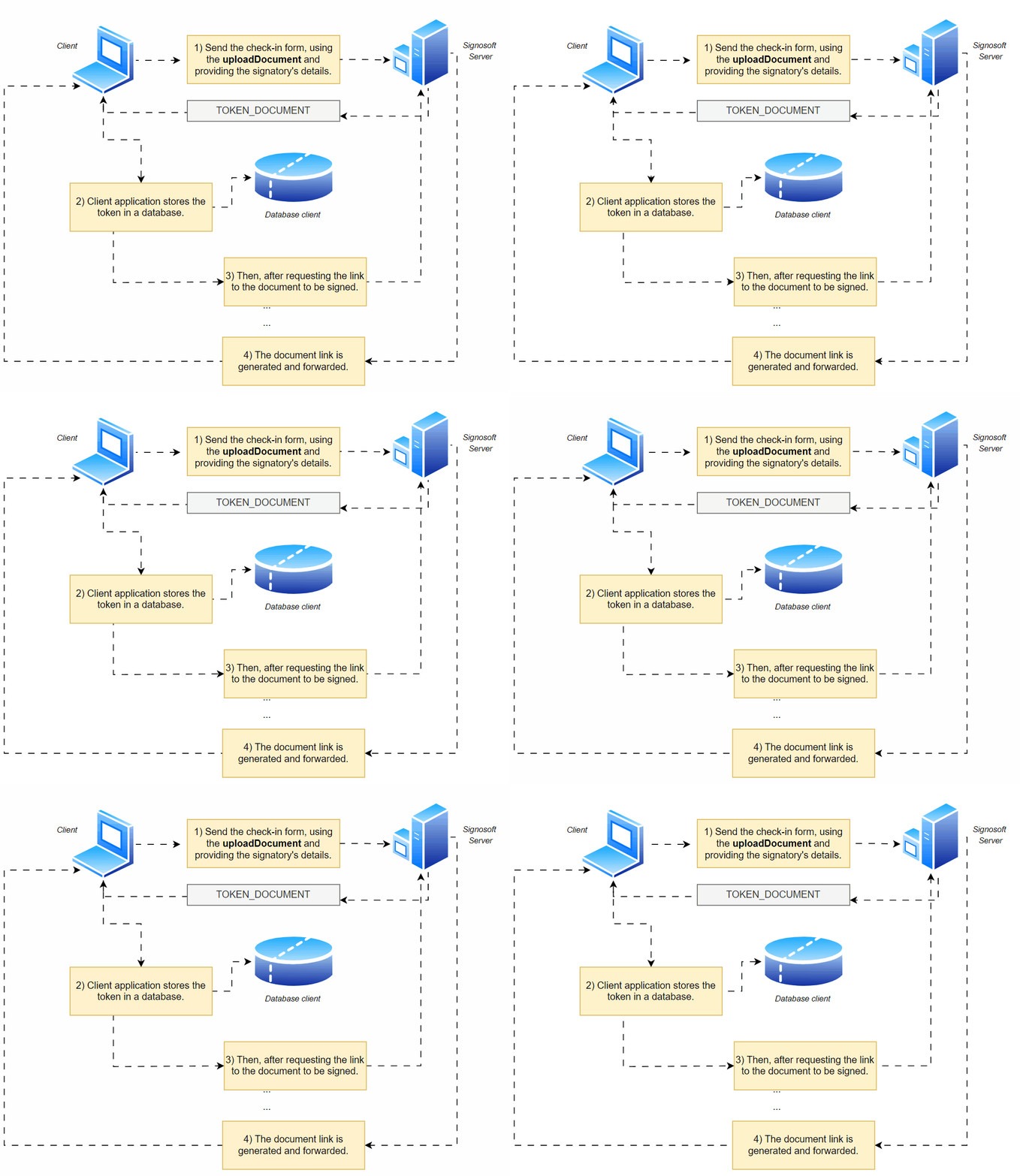
Parameters
-
doctoken – String – Document or contract token returned by the
uploadDocumentorcreateContractmethod. Required - showPanelRight – Boolean – Defines the visibility of the panel on the right side of the GUI(Graphic interface). Optional
- showPanelTop – Boolean – Defines the visibility of the panel on the top side of the GUI. Optional
- showEmailsInSig – Boolean – Defines the visibility of user information in the signature field. Optional
- showPRFinalize – Boolean – Defines the visibility of the "Finalize" button in the right panel. Optional
- showPRDone – Boolean – Defines the visibility of the "Done" button in the right panel. Optional
- showPREmail – Boolean – Defines the visibility of the "Send email" button in the right panel. Optional
- showPRDownload – Boolean – Defines the visibility of the "Download" button in the right panel. Optional
- showPRView – Boolean – Defines the visibility of the "View" button in the right panel. Optional
- showPRSignatures – Boolean – Defines the visibility of the "Signature panel" button in the right panel. Optional
- showPRFindSignature – Boolean – Defines the visibility of the "Find signature" button in the right panel. Optional
- showPRSaveDocument – Boolean – Defines the visibility of the "Save document" button in the right panel. Optional
- showPRReject – Boolean – Defines the visibility of the button to reject signing the document. Optional
- showPRAttachments – Boolean – Specifies if the button to view and edit attachments is displayed in the Signosoft GUI. Optional
- finalizeUrl – String – URL for redirecting if finalizeType is set to "redirect". Optional
-
finalizeType – String – Possible values are:Optional
- Close – Closes the Signosoft mobile application.
- Redirects - the browser to the URL provided in the finalizeUrl parameter. To enable this redirection, the setting must be enabled on the server.
- None – No redirection or closing action.
- signerLogin – String – Specifies the user for the current session. Optional
- validTo – Timestamp – Expiration datetime of the document link. Optional
- validOnce – Boolean – Expires the document link upon first open. Optional
- finalizeWebhookUrl – String – URL where Signosoft sends an HTTP(s) request with docId, docToken, and pluginResult as query parameters. Optional
-
finalizeAutoExecute – String – Possible values are:Optional
- on – Automatically executes finalize action.
- off – Disables auto execution of finalize action.
- confirmRequired – Requires confirmation before executing finalize action.
- confirm – Executes finalize action with confirmation.
- finalizeEnablePlugin – Boolean – Specifies whether the defined finalize plugin should be used. Optional
- allowPartialFinalize – Boolean – Specifies if Signosoft allows finalizing documents that are not completely signed. Optional
- language – String – Allows setting the language of the Signosoft GUI on the generated link. Supported values are: "en", "mn", "pl", "cs", "th", "he", "sk", "hu", "pt", "sr". Optional
-
scrollMode – String – Allows changing the display mode of the Signosoft GUI. Possible values are:Optional
- none – No scrolling mode.
- carousel – Carousel scrolling mode.
- scroll – Standard scrolling mode.
- scroll-width – Width-based scrolling mode.
-
docShowUrlEnable – String – Specifies if the button to show the external URL list is displayed on the Signosoft GUI. The list is set via commands in
uploadDocument/createContractin the JSON array “urls”. Optional - bankIdProtection – String – Specifies BankId user info that is checked against user details when opening direct document link. Example: {"enabled":true, "checkuser":["given_name","family_name", "email", "birthdate"]} Optional
- bankId.data_validation – String – Specifies list of values that are going to be checked against user details when signing with bankId. Example: {"checkuser":["given_name","family_name"]} Optional
How to implement
import java.io.IOException;
import java.net.URI;
import java.net.http.HttpClient;
import java.net.http.HttpRequest;
import java.net.http.HttpResponse;
import java.net.URLEncoder;
import java.nio.charset.StandardCharsets;
import java.net.http.HttpRequest.BodyPublishers;
import java.time.Instant;

public class CreateDocLink {

    public static void main(String[] args) throws IOException, InterruptedException {
        String docToken = "96bfa6e1-6231-4982-bac7-c9cd0c74f433_1722259103356";
        long validTo = Instant.now().getEpochSecond() + 86400; // 24 hours later

        createDocLink(docToken, validTo);
    }

    // Function to create doc link
    private static void createDocLink(String docToken, long validTo) throws IOException, InterruptedException {
        HttpClient client = HttpClient.newHttpClient();
        String requestBody = URLEncoder.encode("doctoken", StandardCharsets.UTF_8) + "=" + URLEncoder.encode(docToken, StandardCharsets.UTF_8) +
                              "&" + URLEncoder.encode("validTo", StandardCharsets.UTF_8) + "=" + URLEncoder.encode(Long.toString(validTo), StandardCharsets.UTF_8);

        HttpRequest request = HttpRequest.newBuilder()
                .uri(URI.create("https://test.signosoft.com/api/REST/createDocLink"))
                .header("Content-Type", "application/x-www-form-urlencoded")
                .header("Authorization", "Bearer --header 'Authorization: ••••••' \
                ")
                .POST(BodyPublishers.ofString(requestBody))
                .build();

        HttpResponse<String> response = client.send(request, HttpResponse.BodyHandlers.ofString());

        // Print response
        System.out.println(response.body());
    }
}
import requests
import time

def create_doc_link():
    url = 'https://signosoft.com/api/REST/createDocLink'
    headers = {
        'Content-Type': 'application/x-www-form-urlencoded',
        'Authorization': 'Bearer --header 'Authorization: ••••••' \
        '
    }

    current_timestamp = int(time.time())
    valid_to = current_timestamp + 86400  # 24 hours later

    payload = {
        'doctoken': 'contr-96bfa6e1-6231-4982-bac7-c9cd0c74f433_1722259103356',
        'validTo': str(valid_to)
    }

    response = requests.post(url, headers=headers, data=payload)
    print(response.text)

create_doc_link()
  <?php

  function createDocLink() {
      $url = 'https://test.signosoft.com/api/REST/createDocLink';
      $headers = array(
          'Content-Type: application/x-www-form-urlencoded',
          'Authorization: Bearer ••••••'
      );

      $currentTimestamp = time();
      $validTo = $currentTimestamp + 86400; // 24 hours later

      $postData = http_build_query(array(
          'doctoken' => '96bfa6e1-6231-4982-bac7-c9cd0c74f433_1722259103356',
          'validTo' => $validTo
      ));

      $ch = curl_init($url);
      curl_setopt($ch, CURLOPT_HTTPHEADER, $headers);
      curl_setopt($ch, CURLOPT_RETURNTRANSFER, true);
      curl_setopt($ch, CURLOPT_POSTFIELDS, $postData);

      $response = curl_exec($ch);
      curl_close($ch);

      echo $response;
  }

  createDocLink();

  ?>
package main

import (
    "fmt"
    "net/http"
    "net/url"
    "strings"
    "time"
    "io/ioutil"
)

func main() {
    createDocLink()
}

func createDocLink() {
    client := &http.Client{}
    data := url.Values{}
    currentTimestamp := time.Now().Unix()
    validTo := currentTimestamp + 86400 // 24 hours later

    data.Set("doctoken", "96bfa6e1-6231-4982-bac7-c9cd0c74f433_1722259103356")
    data.Set("validTo", fmt.Sprintf("%d", validTo))

    req, _ := http.NewRequest("POST", "https://signosoft.com/api/REST/createDocLink", strings.NewReader(data.Encode()))
    req.Header.Add("Content-Type", "application/x-www-form-urlencoded")
    req.Header.Add("Authorization", "Bearer ••••••")

    res, _ := client.Do(req)
    defer res.Body.Close()
    body, _ := ioutil.ReadAll(res.Body)

    fmt.Println(string(body))
}
Returns
{
  "bioId": "ba0017cd8b743def2ff16b2c1c8c8534ead71265e30ad7c0f976b361cd223db5",
  "createDocLinkResult": "OK",
  "link": "https://signosoft.com?bioid=ba0017cd8b743def2ff16b2c1c8c8534ead71265e30ad7c0f976b361cd223db5&server=https://test.signosoft.com/api"
}
- link – String – URL where the GUI was created.
-
createDocLinkResult – String – Describes the result of creating the document link. Possible values are:
- OK The document link was created successfully.
- DOC_NOT_FOUND The document was not found.
- ERROR An error occurred while creating the document link.
- WRONG_DOC_TOKEN The provided document token is incorrect.
- WRONG_DOC_OWNER The document owner is incorrect.
Create Document Link
Getting doclink
Description
To obtain the links created for a document, simply use the REST/getDocLink route. When making the request, the bioid
will be returned, which can be used to create the link URL.
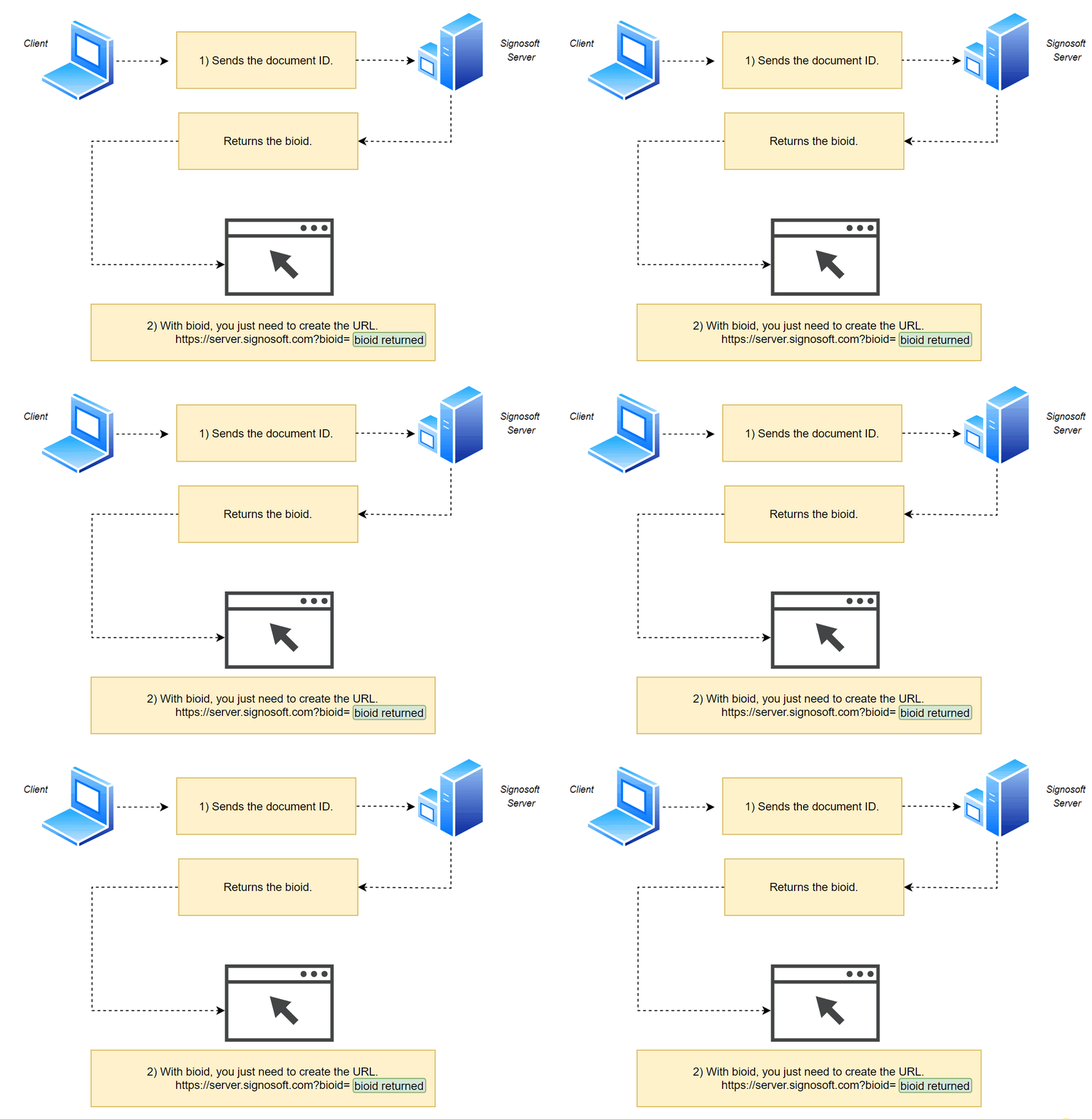
To obtain a document, we use its ID and not the token (as in the previous sections). To obtain the ID of an already created
document, simply use /getDocumentByToken or /getContractByToken.
Parameters
- docId – Integer – ID of the document. Required
How to implement
import java.io.IOException;
import java.net.URI;
import java.net.URLEncoder;
import java.net.http.HttpClient;
import java.net.http.HttpRequest;
import java.net.http.HttpResponse;
import java.nio.charset.StandardCharsets;
import java.net.http.HttpRequest.BodyPublishers;

public class GetDocLink {

    public static void main(String[] args) throws IOException, InterruptedException {
        String docId = "14691";
        getDocLink(docId);
    }

    // Function to get doc link
    private static void getDocLink(String docId) throws IOException, InterruptedException {
        HttpClient client = HttpClient.newHttpClient();
        String requestBody = URLEncoder.encode("docId", StandardCharsets.UTF_8) + "=" + URLEncoder.encode(docId, StandardCharsets.UTF_8);

        HttpRequest request = HttpRequest.newBuilder()
                .uri(URI.create("https://test.signosoft.com/api/REST/getDocLink"))
                .header("Content-Type", "application/x-www-form-urlencoded")
                .header("Authorization", "Bearer ••••••")
                .POST(BodyPublishers.ofString(requestBody))
                .build();

        HttpResponse response = client.send(request, HttpResponse.BodyHandlers.ofString());

        // Print response
        System.out.println(response.body());
    }
}
import requests

def get_doc_link():
    url = 'https://test.signosoft.com/api/REST/getDocLink'
    headers = {
        'Content-Type': 'application/x-www-form-urlencoded',
        'Authorization': 'Bearer ••••••'
    }

    payload = {
        'docId': '14691'
    }

    response = requests.post(url, headers=headers, data=payload)
    print(response.text)

get_doc_link()
  <?php
  function getDocLink() {
      $url = 'https://test.signosoft.com/api/REST/getDocLink';
      $headers = array(
          'Content-Type: application/x-www-form-urlencoded',
          'Authorization: Bearer ••••••'
      );

      $postData = http_build_query(array(
          'docId' => '14691'
      ));

      $ch = curl_init($url);
      curl_setopt($ch, CURLOPT_HTTPHEADER, $headers);
      curl_setopt($ch, CURLOPT_RETURNTRANSFER, true);
      curl_setopt($ch, CURLOPT_POSTFIELDS, $postData);

      $response = curl_exec($ch);
      curl_close($ch);

      echo $response;
  }

  getDocLink();

  ?>
package main

import (
    "fmt"
    "net/http"
    "net/url"
    "strings"
    "io/ioutil"
)

func main() {
    getDocLink()
}

func getDocLink() {
    client := &http.Client{}
    data := url.Values{}
    data.Set("docId", "14691")

    req, _ := http.NewRequest("POST", "https://signosoft.com/api/REST/getDocLink", strings.NewReader(data.Encode()))
    req.Header.Add("Content-Type", "application/x-www-form-urlencoded")
    req.Header.Add("Authorization", "Bearer ••••••")

    res, _ := client.Do(req)
    defer res.Body.Close()
    body, _ := ioutil.ReadAll(res.Body)

    fmt.Println(string(body))
}
Returns
  {
    "result": "OK",
    "links": [
        {
            "validOnce": false,
            "bioId": “c17cae0563a6cadc63d0d8213f5efghh14sewqasd”,
            "validTo": "1519211811670"
            "signer": "example@example.com"
        }
    ]
}
Update documents
Description
To update an existing link, simply enter the document's bioid in the REST/updateDocLink route.
To achieve this result, simply update the link with the validOnce parameter set to true.
Parameters
- bioId – String – Existing document bioId. Required
- validTo – Timestamp – Expiration datetime of the document link. Optional
- validOnce – Boolean – Expires the document link upon first open. Optional
How to implement
import java.io.IOException;
import java.net.URI;
import java.net.URLEncoder;
import java.net.http.HttpClient;
import java.net.http.HttpRequest;
import java.net.http.HttpResponse;
import java.nio.charset.StandardCharsets;
import java.net.http.HttpRequest.BodyPublishers;

public class UpdateDocLink {

    public static void main(String[] args) throws IOException, InterruptedException {
        String bioId = "054109e5e4a48208c2490a5aee680d662277abe0cb55742b4e3a2f62cc1afd3b";
        boolean validOnce = true;
        updateDocLink(bioId, validOnce);
    }

    // Function to update doc link
    private static void updateDocLink(String bioId, boolean validOnce) throws IOException, InterruptedException {
        HttpClient client = HttpClient.newHttpClient();
        String requestBody = URLEncoder.encode("bioId", StandardCharsets.UTF_8) + "=" + URLEncoder.encode(bioId, StandardCharsets.UTF_8) + "&" +
                              URLEncoder.encode("validOnce", StandardCharsets.UTF_8) + "=" + URLEncoder.encode(String.valueOf(validOnce), StandardCharsets.UTF_8);

        HttpRequest request = HttpRequest.newBuilder()
                .uri(URI.create("https://test.signosoft.com/api/REST/updateDocLink"))
                .header("Content-Type", "application/x-www-form-urlencoded")
                .header("Authorization", "Bearer ••••••")
                .POST(BodyPublishers.ofString(requestBody))
                .build();

        HttpResponse<String> response = client.send(request, HttpResponse.BodyHandlers.ofString());

        // Print response
        System.out.println(response.body());
    }
}
import requests

def update_doc_link():
  url = 'https://signosoft.com/api/REST/updateDocLink'
  headers = {
      'Content-Type': 'application/x-www-form-urlencoded',
      'Authorization': 'Bearer ••••••'
  }

  payload = {
      'bioId': '054109e5e4a48208c2490a5aee680d662277abe0cb55742b4e3a2f62cc1afd3b',
      'validOnce': 'true'
  }

  response = requests.post(url, headers=headers, data=payload)
  print(response.text)

update_doc_link()
  <?php

  function updateDocLink() {
      $url = 'https://signosoft.com/api/REST/updateDocLink';
      $headers = array(
          'Content-Type: application/x-www-form-urlencoded',
          'Authorization: Bearer ••••••'
      );

      $postData = http_build_query(array(
          'bioId' => '054109e5e4a48208c2490a5aee680d662277abe0cb55742b4e3a2f62cc1afd3b',
          'validOnce' => 'true'
      ));

      $ch = curl_init($url);
      curl_setopt($ch, CURLOPT_HTTPHEADER, $headers);
      curl_setopt($ch, CURLOPT_RETURNTRANSFER, true);
      curl_setopt($ch, CURLOPT_POSTFIELDS, $postData);

      $response = curl_exec($ch);
      curl_close($ch);

      echo $response;
  }

  updateDocLink();

  ?>
package main

import (
    "fmt"
    "net/http"
    "net/url"
    "strings"
    "io/ioutil"
)

func main() {
    updateDocLink()
}

func updateDocLink() {
    client := &http.Client{}
    data := url.Values{}
    data.Set("bioId", "054109e5e4a48208c2490a5aee680d662277abe0cb55742b4e3a2f62cc1afd3b")
    data.Set("validOnce", "true")

    req, _ := http.NewRequest("POST", "https://test.signosoft.com/api/REST/updateDocLink", strings.NewReader(data.Encode()))
    req.Header.Add("Content-Type", "application/x-www-form-urlencoded")
    req.Header.Add("Authorization", "Bearer ••••••")

    res, _ := client.Do(req)
    defer res.Body.Close()
    body, _ := ioutil.ReadAll(res.Body)

    fmt.Println(string(body))
}
Returns
{
  "result": "OK",
  "link": {
      "bioId": "054109e5e4a48208c2490a5aee680d662277abe0cb55742b4e3a2f62cc1afd3b",
      "json": "{\"docId\":14988,\"docType\":1,\"time\":1722348188070,\"validateExpire\":true,\"username\":\"example@example.com\"}",
      "validOnce": true,
      "signer": "example@example.com"
  }
}
Deleting doclink
Description
To delete a document link, simply enter the bioid.
Parameters
- bioId – String – Existing document bioId. Required
How to implement
import java.io.IOException;
import java.net.URI;
import java.net.URLEncoder;
import java.net.http.HttpClient;
import java.net.http.HttpRequest;
import java.net.http.HttpResponse;
import java.nio.charset.StandardCharsets;
import java.net.http.HttpRequest.BodyPublishers;

public class DeleteDocLink {

    public static void main(String[] args) throws IOException, InterruptedException {
        String bioId = "054109e5e4a48208c2490a5aee680d662277abe0cb55742b4e3a2f62cc1afd3b";
        deleteDocLink(bioId);
    }

    // Function to delete doc link
    private static void deleteDocLink(String bioId) throws IOException, InterruptedException {
        HttpClient client = HttpClient.newHttpClient();
        String requestBody = URLEncoder.encode("bioId", StandardCharsets.UTF_8) + "=" + URLEncoder.encode(bioId, StandardCharsets.UTF_8);

        HttpRequest request = HttpRequest.newBuilder()
                .uri(URI.create("https://signosoft.com/api/REST/deleteDocLink"))
                .header("Content-Type", "application/x-www-form-urlencoded")
                .header("Authorization", "Bearer ••••••")
                .POST(BodyPublishers.ofString(requestBody))
                .build();

        HttpResponse<String> response = client.send(request, HttpResponse.BodyHandlers.ofString());

        // Print response
        System.out.println(response.body());
    }
}
import requests

def delete_doc_link():
    url = 'https://signosoft.com/api/REST/deleteDocLink'
    headers = {
        'Content-Type': 'application/x-www-form-urlencoded',
        'Authorization': 'Bearer ••••••'
    }

    payload = {
        'bioId': '054109e5e4a48208c2490a5aee680d662277abe0cb55742b4e3a2f62cc1afd3b'
    }

    response = requests.post(url, headers=headers, data=payload)
    print(response.text)

delete_doc_link()
<php
function deleteDocLink() {
$url = 'https://signosoft.com/api/REST/deleteDocLink';
$headers = array(
'Content-Type: application/x-www-form-urlencoded',
'Authorization: Bearer ••••••'
);
$postData = http_build_query(array(
'bioId' => '054109e5e4a48208c2490a5aee680d662277abe0cb55742b4e3a2f62cc1afd3b'
));
$ch = curl_init($url);
curl_setopt($ch, CURLOPT_HTTPHEADER, $headers);
curl_setopt($ch, CURLOPT_RETURNTRANSFER, true);
curl_setopt($ch, CURLOPT_POSTFIELDS, $postData);
$response = curl_exec($ch);
curl_close($ch);
echo $response;
}
deleteDocLink();
?>package main
import (
"fmt"
"net/http"
"net/url"
"strings"
"io/ioutil"
)
func main() {
deleteDocLink()
}
func deleteDocLink() {
client := &http.Client{}
data := url.Values{}
data.Set("bioId", "054109e5e4a48208c2490a5aee680d662277abe0cb55742b4e3a2f62cc1afd3b")
req, _ := http.NewRequest("POST", "https://signosoft.com/api/REST/deleteDocLink", strings.NewReader(data.Encode()))
req.Header.Add("Content-Type", "application/x-www-form-urlencoded")
req.Header.Add("Authorization", "Bearer ••••••")
res, _ := client.Do(req)
defer res.Body.Close()
body, _ := ioutil.ReadAll(res.Body)
fmt.Println(string(body))
}
Returns
{
  "result": "OK"
}
-
result – String – Describes the result of delete the document link. Possible values are:
- OK The document link was deleted successfully.
- LINK_NOT_EXIST Link not found.
Delete document link
Next sections!
We have reached the end of this document links section, with the knowledge acquired in this section, your application will be able to generate document viewing links.
Imagine that your application needs to implement a functionality to sign documents. How can we achieve this result?
In the next section, routes for document signatures will be covered.
Signatures
Through signature routes, it is possible to sign documents and verify whether the fields of a document are signed.
Signing documents
Description
To sign documents, use the REST/signDocument route, providing the document ID, the signature ID, and the signature method ID (used to create the document).
REST/uploadDocument) or the contract (REST/createContract).
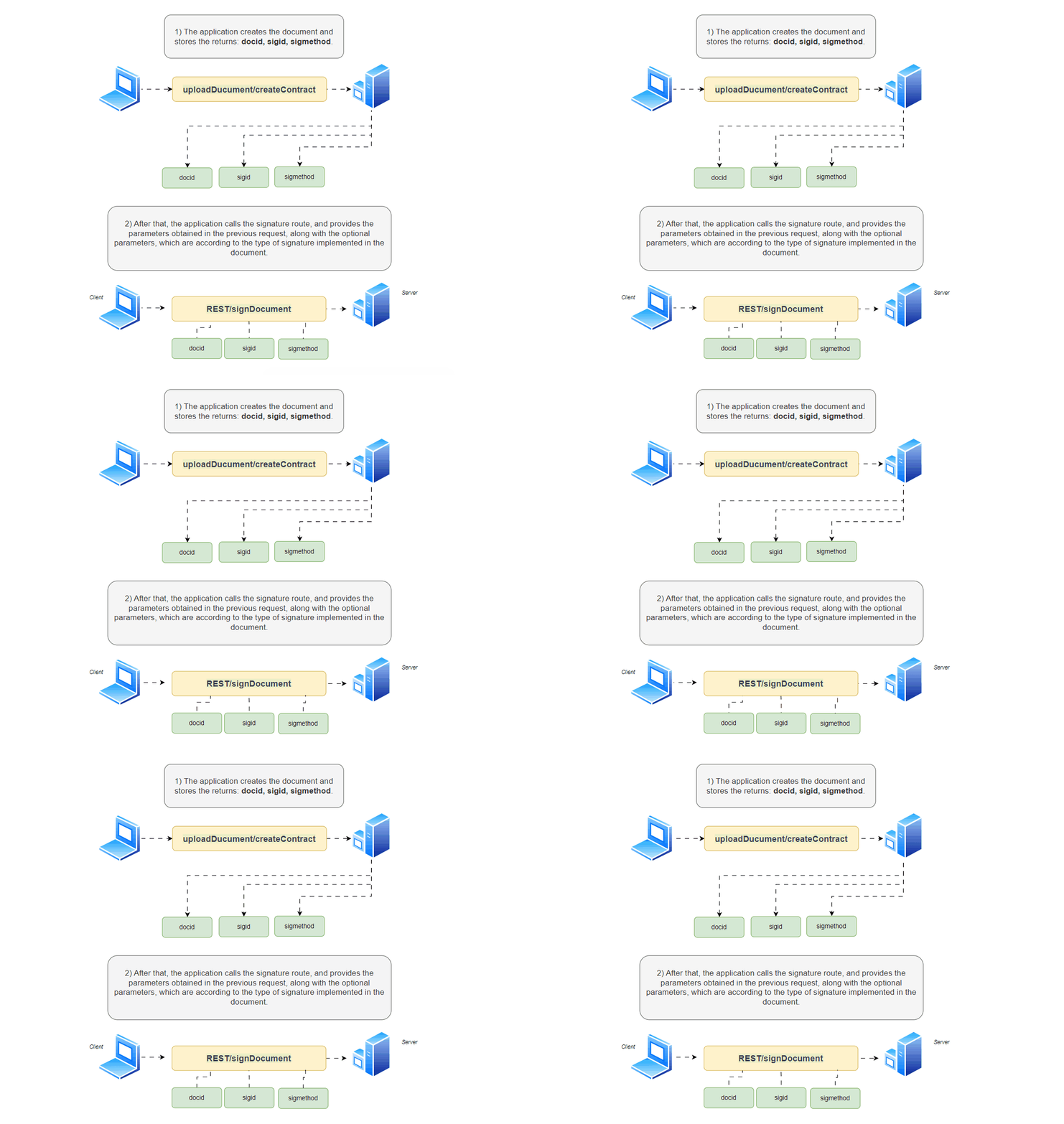
/REST/getDocumentByToken and /REST/getContractByToken routes.
Parameters
- docid – Integer – Identification of the document. Required
- sigid – Integer – Identification of the signature field. Required
- methodid – Integer – Identification of the signing method. Required
- password – String – User typed password for signing with token. Optional
- sigImgBase64 – String – BASE64 encoded image of the signature. Optional
- sigBioData – String – BASE64 encoded signature data package. Optional
- docToken – String – Document identification token. Optional
- docOwner – String – Login of the owner of the document. Optional
- sigPassword – String – Password provided by the user to sign with user certificate. Optional
- acroFields – String – Array of key-value pairs to fill acroform PDF. Optional
- useTimestamp – Boolean – Specifies if timestamp is to be used with the signature. Optional
How to implement
import java.io.IOException;
import java.net.URI;
import java.net.URLEncoder;
import java.net.http.HttpClient;
import java.net.http.HttpRequest;
import java.net.http.HttpResponse;
import java.nio.charset.StandardCharsets;
import java.net.http.HttpRequest.BodyPublishers;

public class SignDocument {

    public static void main(String[] args) throws IOException, InterruptedException {
        String docId = "15051";
        String sigId = "16133";
        String methodId = "3";
        String sigImgBase64 = "iVBORw0KGgoAAAANSUhEUgAABD8AAAE2CAYAAABm/jkhAAAAAXNS...";
        String signerName = "Paul";
        String docOwner = "email_owner@example.com";
        String login = "email_signer2@example.com";
        String authType = "biometric";

        signDocument(docId, sigId, methodId, sigImgBase64, signerName, docOwner, login, authType);
    }

    // Function to sign document
    private static void signDocument(String docId, String sigId, String methodId, String sigImgBase64, String signerName, String docOwner, String login, String authType) throws IOException, InterruptedException {
        HttpClient client = HttpClient.newHttpClient();
        String requestBody = URLEncoder.encode("docid", StandardCharsets.UTF_8) + "=" + URLEncoder.encode(docId, StandardCharsets.UTF_8) + "&" +
                              URLEncoder.encode("sigid", StandardCharsets.UTF_8) + "=" + URLEncoder.encode(sigId, StandardCharsets.UTF_8) + "&" +
                              URLEncoder.encode("methodid", StandardCharsets.UTF_8) + "=" + URLEncoder.encode(methodId, StandardCharsets.UTF_8) + "&" +
                              URLEncoder.encode("sigImgBase64", StandardCharsets.UTF_8) + "=" + URLEncoder.encode(sigImgBase64, StandardCharsets.UTF_8) + "&" +
                              URLEncoder.encode("signerName", StandardCharsets.UTF_8) + "=" + URLEncoder.encode(signerName, StandardCharsets.UTF_8) + "&" +
                              URLEncoder.encode("docOwner", StandardCharsets.UTF_8) + "=" + URLEncoder.encode(docOwner, StandardCharsets.UTF_8) + "&" +
                              URLEncoder.encode("useTimestamp", StandardCharsets.UTF_8) + "=" + URLEncoder.encode("true", StandardCharsets.UTF_8) + "&" +
                              URLEncoder.encode("login", StandardCharsets.UTF_8) + "=" + URLEncoder.encode(login, StandardCharsets.UTF_8) + "&" +
                              URLEncoder.encode("sigBioData", StandardCharsets.UTF_8) + "=" + URLEncoder.encode("", StandardCharsets.UTF_8) + "&" +
                              URLEncoder.encode("authType", StandardCharsets.UTF_8) + "=" + URLEncoder.encode(authType, StandardCharsets.UTF_8) + "&" +
                              URLEncoder.encode("finalizeAutoExecute", StandardCharsets.UTF_8) + "=" + URLEncoder.encode("off", StandardCharsets.UTF_8);

        HttpRequest request = HttpRequest.newBuilder()
                .uri(URI.create("https://signosoft.com/api/REST/signDocument"))
                .header("Content-Type", "application/x-www-form-urlencoded")
                .header("Authorization", "Bearer ••••••")
                .POST(BodyPublishers.ofString(requestBody))
                .build();

        HttpResponse<String> response = client.send(request, HttpResponse.BodyHandlers.ofString());

        // Print response
        System.out.println(response.body());
    }
}
import requests
def sign_document():
url = 'https://signosoft.com/api/REST/signDocument'
headers = {
'Content-Type': 'application/x-www-form-urlencoded',
'Authorization': 'Bearer ••••••'
}
payload = {
'docid': '15051',
'sigid': '16133',
'methodid': '3',
'sigImgBase64': 'iVBORw0KGgoAAAANSUhEUgAABD8AAAE2CAYAAABm/jkhAAAAAXNS...',
'signerName': 'Paul',
'docOwner': 'email_owner@example.com',
'useTimestamp': 'true',
'login': 'email_signer2@example.com',
'sigBioData': '',
'authType': 'biometric',
'finalizeAutoExecute': 'off'
}
response = requests.post(url, headers=headers, data=payload)
print(response.text)
sign_document()<php
function signDocument() {
$url = 'https://signosoft.com/api/REST/signDocument';
$headers = array(
'Content-Type: application/x-www-form-urlencoded',
'Authorization: Bearer ••••••'
);
$postData = http_build_query(array(
'docid' => '15051',
'sigid' => '16133',
'methodid' => '3',
'sigImgBase64' => 'iVBORw0KGgoAAAANSUhEUgAABD8AAAE2CAYAAABm/jkhAAAAAXNS...',
'signerName' => 'Paul',
'docOwner' => 'email_owner@example.com',
'useTimestamp' => 'true',
'login' => 'email_signer2@example.com',
'sigBioData' => '',
'authType' => 'biometric',
'finalizeAutoExecute' => 'off'
));
$ch = curl_init($url);
curl_setopt($ch, CURLOPT_HTTPHEADER, $headers);
curl_setopt($ch, CURLOPT_RETURNTRANSFER, true);
curl_setopt($ch, CURLOPT_POSTFIELDS, $postData);
$response = curl_exec($ch);
curl_close($ch);
echo $response;
}
signDocument();
?>package main
import (
"fmt"
"net/http"
"net/url"
"strings"
"io/ioutil"
)
func main() {
signDocument()
}
func signDocument() {
client := &http.Client{}
data := url.Values{}
data.Set("docid", "15051")
data.Set("sigid", "16133")
data.Set("methodid", "3")
data.Set("sigImgBase64", "iVBORw0KGgoAAAANSUhEUgAABD8AAAE2CAYAAABm/jkhAAAAAXNS...")
data.Set("signerName", "Paul")
data.Set("docOwner", "email_owner@example.com")
data.Set("useTimestamp", "true")
data.Set("login", "email_signer2@example.com")
data.Set("sigBioData", "")
data.Set("authType", "biometric")
data.Set("finalizeAutoExecute", "off")
req, _ := http.NewRequest("POST", "https://signosoft.com/api/REST/signDocument", strings.NewReader(data.Encode()))
req.Header.Add("Content-Type", "application/x-www-form-urlencoded")
req.Header.Add("Authorization", "Bearer ••••••")
res, _ := client.Do(req)
defer res.Body.Close()
body, _ := ioutil.ReadAll(res.Body)
fmt.Println(string(body))
}
Returns
{
    "signResult": "SIGN_OK",
    "sigimg": "iVBORw0KGgoAAAANSUhEUgAABD8AAAE2CAYAAABm/jkhAAAAAXNS..."
}
- sigimg – String – BASE64 encoded image of the rendered signature.
-
signResult – String – Describes the state of signing the document. Possible values are:
- SIGN_OK The signing process was successful.
- SIGN_ERROR An error occurred during the signing process.
- WRONG_PASSWORD The provided password is incorrect.
- SIGN_IMG_ERROR An error occurred with the signature image.
- SIGN_IMG_EMPTY The signature image is empty.
- SIGN_TOKEN_NOT_MATCH The provided signing token does not match.
- SIG_INVALID The signature is invalid.
Sign document
Checking unsigned
Description
Often times, we want to check whether all fields in a document have been compactly signed. Using the REST/checkUnsigned method, we can obtain
this information by simply providing the document ID.
Parameters
- docId – Integer – Identification of the document to be checked. Required
How to implement
import java.io.BufferedReader;
import java.io.InputStreamReader;
import java.io.OutputStream;
import java.net.HttpURLConnection;
import java.net.URL;

public class CheckUnsigned {
    public static void main(String[] args) {
        try {
            checkUnsigned();
        } catch (Exception e) {
            e.printStackTrace();
        }
    }

    public static void checkUnsigned() throws Exception {
        String url = "https://signosoft.com/api/REST/checkUnsigned";
        String data = "docId=15111";

        URL obj = new URL(url);
        HttpURLConnection con = (HttpURLConnection) obj.openConnection();
        con.setRequestMethod("POST");
        con.setRequestProperty("Content-Type", "application/x-www-form-urlencoded");
        con.setRequestProperty("Authorization", "Bearer ••••••");
        con.setDoOutput(true);

        try (OutputStream os = con.getOutputStream()) {
            os.write(data.getBytes());
        }

        BufferedReader in = new BufferedReader(new InputStreamReader(con.getInputStream()));
        String inputLine;
        StringBuilder response = new StringBuilder();
        while ((inputLine = in.readLine()) != null) {
            response.append(inputLine);
        }
        in.close();

        System.out.println(response.toString());
    }
}
import requests
def check_unsigned():
url = 'https://signosoft.com/api/REST/checkUnsigned'
headers = {
'Content-Type': 'application/x-www-form-urlencoded',
'Authorization': 'Bearer ••••••'
}
data = {
'docId': '15111'
}
response = requests.post(url, headers=headers, data=data)
print(response.text)
check_unsigned()
<php
function checkUnsigned() {
    $url = 'https://test.signosoft.com/api/REST/checkUnsigned';
    $headers = array(
        'Content-Type: application/x-www-form-urlencoded',
        'Authorization: Bearer ••••••'
    );

    $postData = http_build_query(array(
        'docId' => '15111'
    ));

    $ch = curl_init($url);
    curl_setopt($ch, CURLOPT_HTTPHEADER, $headers);
    curl_setopt($ch, CURLOPT_RETURNTRANSFER, true);
    curl_setopt($ch, CURLOPT_POSTFIELDS, $postData);

    $response = curl_exec($ch);
    curl_close($ch);

    echo $response;
}

checkUnsigned();
?>
package main
import (
"fmt"
"net/http"
"net/url"
"strings"
"io/ioutil"
)
func main() {
checkUnsigned()
}
func checkUnsigned() {
client := &http.Client{}
data := url.Values{}
data.Set("docId", "15111")
req, _ := http.NewRequest("POST", "https://signosoft.com/api/REST/checkUnsigned", strings.NewReader(data.Encode()))
req.Header.Add("Content-Type", "application/x-www-form-urlencoded")
req.Header.Add("Authorization", "Bearer ••••••")
res, _ := client.Do(req)
defer res.Body.Close()
body, _ := ioutil.ReadAll(res.Body)
fmt.Println(string(body))
}
Returns
{
  "checkResult": "UNSIGNED"
}
-
checkResult – String – Describes the state of signatures in the document. Possible values are:
- ALL_SIGNED All required signatures have been completed.
- UNSIGNED Some required signatures are missing.
- NO_SIG_IN_DOC No signatures are present in the document.
Checking signatures
Next sections!
We have reached the end of this section on verifying unsigned documents.
In the next versions, we will make new features available, such as Templates, signature validation, integrations with Webhooks and many more!
FAQ
A FAQ is a list of frequently asked questions (FAQs) and answers on a particular topic.